


Privilege creep is the gradual accumulation or retention of permissions that no longer match an identity’s current responsibilities. Also called access creep or permission creep, it often happens when someone changes roles, finishes a project or receives temporary access. Permissions that once made sense remain available after the need has passed.
It is a drift away from least privilege, which NIST defines as granting each entity only the access it needs to perform its function. The original grant may have been appropriate; the problem begins when the work changes and the permissions do not.
How does privilege creep happen?#
Consider a hypothetical employee, Maya, moving from customer support to finance. Her new finance access arrives on time, but she remains in a support group that allows customer-data exports. Her job has changed; her access now covers both roles.
Because the export permission comes through a group, checking only her direct grants would miss it.
Common causes include:
- Role changes that only add access. New responsibilities trigger provisioning, while old permissions stay in place.
- Temporary grants without effective expiration. Project or emergency access survives the task it was approved for.
- Copied permissions. A teammate’s accumulated access becomes the starting point for another person’s role.
- Mergers and reorganizations. Changed responsibilities and overlapping systems leave people with permissions from earlier teams or organizations.
An overlap can be legitimate. Maya might need support access during a handover. An accountable owner and an end date help distinguish that temporary need from access nobody remembers granting. The Carnegie Mellon SEI insider-threat guide recommends checking and removing unnecessary permissions after role changes as part of preventing privilege creep.
Why does privilege creep matter?#
Unneeded permissions increase what an identity can reach if it is misused or compromised. If someone compromises Maya’s account, her forgotten export permission could expose customer information unrelated to her finance work. Verizon’s 2026 Data Breach Investigations Report traced 13% of breaches to credential abuse as the initial access vector, so every unneeded permission widens what a stolen login can reach.
Accumulated permissions also make access decisions harder: reviewers must work out which grants still serve a purpose, who owns them and whether earlier removals took effect.
Infrequent use is a reason to investigate, not an automatic reason to revoke. Emergency responsibilities and occasional business tasks can justify access that rarely appears in usage records.
How can you prevent and fix privilege creep?#
Effective cleanup connects a business decision to a verified change in access and keeps the same permissions from accumulating again.
1. Find effective access and its owners#
Start with what the identity can actually do, including permissions from direct grants, groups, nested memberships and roles. Identify the source controlling each permission and the person responsible for the resource.
For Maya, that means locating the support group behind the export permission, since removing a visible grant fails if another membership provides the same capability. If you cannot trace the source or identify the resource owner, assign someone to investigate and track the unresolved access as an exception.
2. Check the current business need#
Ask the manager and resource owner to compare permissions with current responsibilities. Use role, task and usage context to support their decision. Record why access should stay, change or end.
If Maya still supports a handover, record who owns the exception and when it ends. Otherwise, remove the unnecessary access from its controlling source while preserving permissions she still needs.
3. Make removal part of the mover workflow#
Treat a role change as a decision about both new and existing access. The mover stage of the joiner, mover and leaver lifecycle should account for old-role permissions, the new baseline and approved overlap. For a broader look at how these stages fit together, see the JML process guide.
Assign an owner to exceptions and manual changes so an incomplete workflow does not quietly become permanent access.
4. Scope and expire temporary access#
For eligible tasks, just-in-time access provides permissions when needed for a limited period. Define the resource, permitted actions, approval conditions and expiration before granting access. Confirm that expiration removes the effective permission, and investigate failures.
5. Review access and verify the outcome#
Use user access reviews to find lingering permissions, including those missed during role changes. Set review timing according to resource sensitivity, business changes and applicable control requirements; one interval will not suit every system.
A decision to revoke is only part of the job. Check that the change completed, look for alternate access paths and track unresolved exceptions. Maya’s case closes when her unnecessary export capability is gone, not merely when someone marks it for removal. To run reviews at scale, see how to automate user access reviews.
Can AI agents experience privilege creep?#
Yes. An AI agent’s access can outlast the task that justified it. Imagine an invoice agent that normally reads records. A temporary workflow requires write access, but the permission remains after that workflow ends. This is privilege creep; overly broad access granted at the outset is a related problem, but not necessarily creep.
The agent, its account and its credentials are different things. An agent may use a dedicated identity, share an account or inherit permissions through another identity. Inherited credentials, accumulated permissions and overly broad authority create risks discussed in OWASP’s agentic application guidance and NIST’s analysis of agent identity.
Assign an accountable human owner to check the agent’s actual tools, resources and permissions, remove the unneeded write access and confirm the invoice task still works. Check shared-account dependencies first; a list of agent names alone cannot show what they can access.
How can C1.ai help address privilege creep?#
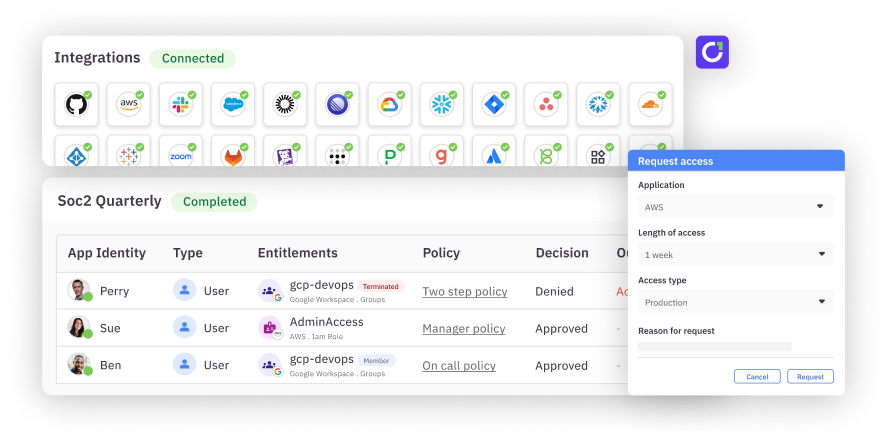
C1.ai (formerly ConductorOne) helps teams respond to role changes with configured lifecycle workflows, assess lingering grants through access reviews, and limit the duration of eligible grants with just-in-time access. These identity governance and administration (IGA) capabilities connect changes in responsibility to decisions about access.
Explore how C1.ai supports least-privilege access.
Frequently asked questions#
What is privilege creep?#
Privilege creep is the accumulation or retention of permissions that no longer match an identity’s current responsibilities.
What causes privilege creep?#
Role changes, temporary grants without effective expiration, copied permissions and organizational changes can leave old access in place after the need has passed.
How is privilege creep different from privilege escalation?#
Privilege creep describes access accumulating or remaining over time. Privilege escalation involves gaining unauthorized greater access; the two can coexist.
How can teams identify privilege creep?#
Compare current responsibilities with effective permissions, including access inherited through groups and roles. Ask the relevant manager and resource owner to assess permissions that no longer appear necessary.
How can organizations prevent privilege creep?#
Update access when responsibilities change, limit the duration of eligible temporary grants, and review permissions regularly. Verify that unnecessary access is removed from its controlling source.
How does privilege creep affect AI agents?#
An agent can retain permissions after a task ends or changes. Its accountable owner should review the identities, tools and resources it uses and remove access the workload no longer needs.