

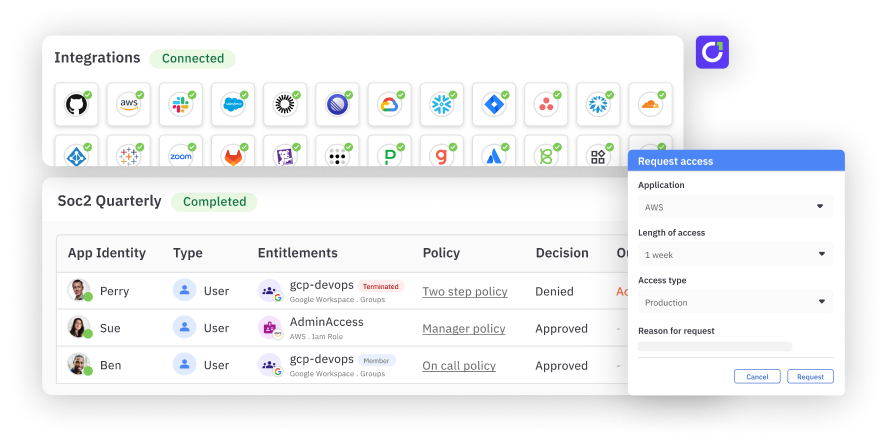
Just-in-time (JIT) access provides users with the minimum level of access required to a system, only when they need it, and for a limited amount of time. By reducing how long users can reach sensitive applications or data, JIT access makes sure that permissions aren’t left open indefinitely.
If your organization already uses an identity and access management (IAM) or privileged access management (PAM) system, JIT access can be enabled within that system. APIs or integrations allow the IAM system and the resource requiring access to talk to each other.
JIT access isn’t meant to replace individual end-user accounts; it’s a way to avoid unnecessary always-on access (standing access). In a zero trust model, trust is never assumed, and every access request is continuously verified.
JIT access not only verifies each request but also enforces the principle of least privilege (PoLP) by granting temporary, minimal access.
How does JIT access work?#
- Zero trust baseline: Employees and contractors start with zero standing privileges to sensitive systems or data.
- Initiating access request: When a user needs to perform a specific task (for example, database maintenance or code deployment), they initiate a JIT request using an identity management system.
- Adding request specifics: The exact system or resource they need access to, the level of access required, the period of time for which access is needed, and the reason for this access request are all included.
- Automatically checking policies: The JIT system checks the incoming request against predefined access control policies, role-based use cases, clearance levels, and any active security alerts or lockdowns.
- Approving the request: Approvals are automatic for routine requests matching predefined policies. Privilege elevations or unusual requests need a designated approver.
- Multi-factor authentication: Upon approval, the user must usually complete a multi-factor authentication (MFA) process to receive the temporary access.
- Revoking access: All granted permissions are automatically revoked when the set time limit expires or if the user logs out. The entire JIT session is logged for compliance and security.
Standing access vs. birthright access#
Standing access offers continuous, always-on access without expiration. Birthright access, on the other hand, is automatically granted based on preset rules and adjusted as roles or conditions change within an organization.
Standing access | Birthright access | |
Definition | Continuous, always-on access without time limits | Automatically assigned access based on preset roles or attributes |
Access duration | Permanent, until manually revoked | Dynamic — granted during onboarding and only updated if the role changes |
Risk | Higher risk compared to birthright access | Lower risk of unused access |
Administrative overhead | Lower, because frequent updates aren’t required | Low, because access assignment is automatic |
Just-in-time access vs. birthright access#
Within IAM, birthright access grants entitlements when specific conditions—such as job title—are met. This access is automatically revoked if those conditions change, during a change in job title or department.
Compared to just-in-time privileged access, birthright access reduces administrative overhead and makes for a more convenient user experience.
JIT access | Birthright access | |
Access duration | Temporary, only when needed, and revoked automatically after use | Permanent or long-term, based on the user's role or group membership |
Security model | Obeys zero trust and enforces PoLP | Grants broad, standing access; does not toe the line with PoLP |
Privilege management | On demand and based on specific tasks or requests — cinches unnecessary access | Users hold access privileges throughout their tenure — can increase privilege creep |
Approval process | Requires approval for each access request, usually via MFA or other conditional policies | Granted automatically at onboarding without ongoing oversight |
Flexibility | Highly flexible; can be time-based, context-aware, or role-based access control (RBAC) | Less flexible; requires updates if access needs to be changed |
Audit and compliance | Detailed logging and tracking are available for every request | Less granular logging — makes compliance audits more tedious |
Risk exposure | Reduces the attack surface by limiting the duration of access | Prone to risk due to persistent, long-term access that attackers can exploit |
Scalability | Scales efficiently, especially in large, dynamic environments with frequent access changes | Static roles become difficult to manage as the organization grows |
PAM vs. JIT-enabled PAM#
Standard PAM solutions extend static control of privileged accounts but leave users with broad, persistent access. This can become a risk over time. JIT-enabled PAM works on demand, granting privileges only when needed.
Standard PAM | JIT-enabled PAM | |
Purpose | Acts as a sluice for privileged accounts — admin or root, with full-time, non-restricted access | For on-demand access to privileged accounts — granting temporary, task-specific access when necessary |
Access granularity | Broad, ongoing access to multiple critical systems inherent to privileged roles | Fine-grained, context-aware access, granting privileges only for specific tasks, at specific times |
User interaction | Users retain high-level access indefinitely. Re-authentication for privileged activities is most often not required. | Users must request access for each task. Access is revoked automatically when the task is completed. |
Incident response | Requires continuous monitoring to detect misuse or abuse; leads to slow incident detection | Allows faster incident detection by limiting access windows and leaving little room for privilege misuse |
Cost and resource management | High costs because privileged sessions need 24/7 monitoring | Lower ongoing costs because JIT access removes the need for full-time access monitoring |
Types of just-in-time access#
1. Justification-based access control#
Also known as “broker and remove” access, this type of JIT requires users to provide a reason for requesting privileged accounts. Once this request comes through, a designated authority approves or denies access. Broker and remove access is ideal for environments with strict compliance requirements.
2. Ephemeral accounts#
These “temporary accounts” or “zero-standing privilege” accounts are activated only when needed and are instantly deactivated and deleted after use.
- For humans: Contractors on short-term projects can request ephemeral accounts so no lingering permissions remain after the contract ends.
- For AI & Bots: This model is critical for agentic AI. Instead of giving an AI agent a permanent API key, it generates an ephemeral service account to complete a specific task (like a data migration) and destroys the identity immediately after, preventing secret sprawl.
3. Temporary elevation#
Temporary elevation raises privileges on a by-request basis. Privileges are then automatically taken back after the specified period expires. If employees occasionally need admin-level access, this is the type of JIT access to use.
Break-glass access, on the other hand, is emergency or contingency access for authorized individuals. These individuals can bypass regular access controls to resolve emergency cybersecurity incidents.
Benefits of just-in-time access#
JIT access enforces PoLP#
JIT access moves organizations closer to true least privilege by granting access only when necessary and for the least amount of time. Unlike birthright access, which often leaves permissions open indefinitely, JIT ensures that users have zero standing privileges by default, closing the door to needless security risks.
Automates provisioning and deprovisioning#
JIT access automates the entire access lifecycle—from request to revocation. By integrating with Identity Providers (IdPs) and infrastructure via APIs, JIT systems can provision temporary roles on the fly based on real-time attributes.
For example, when a user needs AWS access, the system assigns a temporary role for that specific session and automatically revokes it when the session ends, eliminating the administrative burden of manual cleanup.
Simplifies compliance and auditing#
JIT creates a clean, event-based audit trail for every privileged action. Instead of trying to explain why a user had standing admin rights for a year, auditors can see exactly who accessed what, when, and—most importantly—why (via justification logs). This significantly reduces the time spent on manual access reviews for frameworks like SOX, HIPAA, and GDPR.
Includes flexible access controls#
Creating custom roles that match certain job functions or tasks within your organization is easy with C1.ai. For example, you could design a role that grants temporary access to financial data only for users in the accounting department during audit season.
You can also set up multistep approval workflows for high-risk applications — such as customer databases — requiring approvals from both a manager and the security team before opening up access.
Enables secure self-service#
JIT removes the bottleneck of IT tickets. Users can request access via Slack, CLI, or a web portal, choosing from a catalog of pre-approved permissions. Because low-risk requests can be auto-approved based on policy, engineering teams maintain their velocity without bypassing security protocols.
Adds context to approval decisions#
For high-risk requests that require human review, JIT systems provide decision support. Approvers can see the context behind the request—such as the user's justification, the specific resource being accessed, and the duration—ensuring that rubber-stamp approvals are replaced with informed risk decisions.
**Feature highlight →**the C1.ai Access Copilot uses AI to give risk-based recommendations that guide approvers. Along with the JIT access request, approvers can see the user’s past access patterns, behaviors, compliance tags, and more.
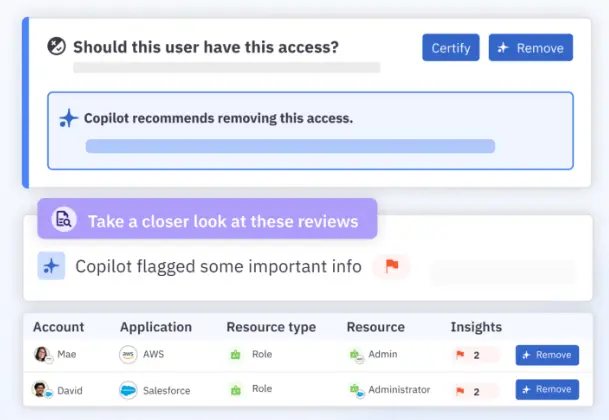
All of these features act as stumbling blocks against both internal and external security threats. JIT prevents internal users from having unnecessary long-term access privileges. Detailed audit logs can help identify unusual access patterns — a sign of external threat actors.
How does JIT work together with other security controls?#
With cloud security posture management (CSPM)#
CSPM tools shepherd cloud configurations and can identify vulnerabilities or misconfigurations. When JIT is in the mix, users only have limited access to sensitive cloud resources.
For example, if an admin needs to configure a cloud server, JIT ensures access is granted for that session alone. Alongside this, CSPM tools verify that the cloud configuration remains airtight after the fact.
With identity governance and administration (IGA)#
IGA tracks user identities across their lifecycle — during onboarding, role changes, and offboarding. JIT and IGA together make sure that even if a user has broad role-based privileges, they don’t have constant access to all sensitive systems.
With security information and event management (SIEM)#
SIEM systems shadow JIT to spot unusual patterns in access requests. In a way, JIT reduces the overhead on the SIEM system by lowering the number of privileged actions that need to be tracked. If an unauthorized access request is flagged, the SIEM system can automatically trigger alerts or block further access.
Related → What Is Cloud Infrastructure Entitlement Management (CIEM)?
JIT access best practices#
To effectively implement Zero Standing privileges without slowing down operations, organizations should follow these core practices:
1. Establish clear validity periods#
Not all tasks take the same amount of time. Avoid default 24-hour access windows.
- Standard tasks: Set tight windows (e.g., 1–4 hours) for routine maintenance.
- On-call rotations: Align access duration with the on-call shift schedule.
- AI agents: Limit machine access strictly to the runtime of the specific operation (often measured in minutes).
2. Apply risk-based approval workflows#
Avoid a "one-size-fits-all" approval chain. If every request requires a manual approval, you risk "JIT exhaustion," where approvers simply click "yes" to clear the queue. As one developer shared in a discussion on JIT implementation:
"The main problem I see is JIT exhaustion. No one is taking the time to carefully review if JIT requests are actually needed. A coworker asks for one, and someone approves it, no questions asked... It slows everyone down and wastes time, and the value add isn't really clear."
To prevent this rubber-stamping, use context to determine friction:
- Low risk: Read-only access to non-sensitive logs should be ** ** auto-approved or logged-only.
- High risk: Write access to production databases or root privileges should require multi-stage approvals (e.g., peer review + manager sign-off) and mandatory MFA re-authentication.
3. Enforce JIT for machine identities (NHIs)#
Do not exempt service accounts from JIT policies. Vendors and developers often push for permanent access because it is easier, but this creates significant risk. A Reddit user noted this common friction point:
"I’ve had vendors say they NEED 'super admin' rights on service accounts because that’s what they 'tested' with… only to run with limited permissions and work just fine."
Don't accept these defaults. Just as humans shouldn't have standing admin rights, AI agents and service accounts should request privileges via API only when performing active workloads.
Related → Identity Lifecycle Management for Non-Human Identities
4. Mandate justification and context#
Every JIT request should require a justification. "Fixing stuff" is not a valid reason. Enforcing a link to a specific Jira ticket, PagerDuty incident, or Salesforce case creates a clear audit trail that explains why access was granted, not just who requested it.
5. Regularly audit break-glass usage#
While JIT handles day-to-day access, emergency break-glass accounts bypass standard workflows. These events should be rare. Review every break-glass usage within 24 hours to ensure it was a legitimate emergency and that access was properly revoked.
Moving from birthright to JIT access with C1.ai#
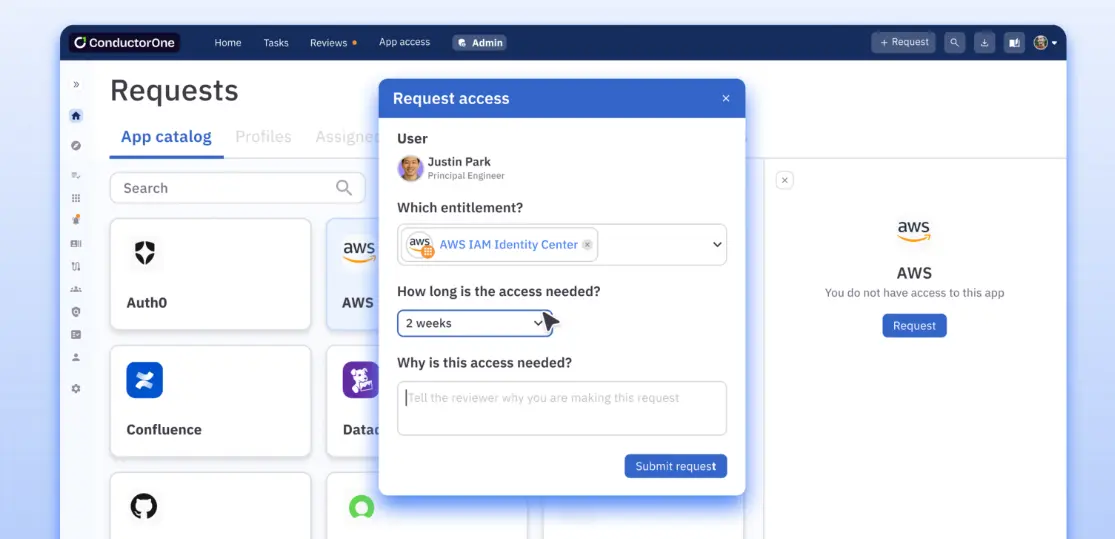
Implementing JIT access doesn't require a rip-and-replace of your infrastructure. C1.ai streamlines this journey into actionable steps:
- Audit your standing privileges: Use the C1.ai discovery features to map all existing access. Identify which roles have always-on admin rights and group them by risk level and frequency of use.
- Define granular JIT policies: Create custom policies for each resource. Instead of vague admin roles, define specific entitlements (e.g., "read-only production DB") with a limited time frame—ranging from minutes for AI agents to hours for on-call engineers.
- Enable seamless self-service: Configure the C1.ai bot for Slack, the web app, or the CLI. This ensures users' requests feel like a natural part of the developer workflow, not a bureaucratic hurdle.
- Automate approval logic: Don't bottleneck your team. Configure auto-approval access policies for low-risk resources (e.g., dev environments) while requiring multi-stage approvals and MFA verification for high-risk production assets.
- Establish break-glass protocols: For true emergencies, set up break-glass procedures that bypass standard approvals but trigger immediate, high-priority alerts to the security team.
- Phase out standing access: Start by migrating non-critical systems to JIT. Once users are comfortable with the workflow, systematically revoke standing permissions for critical infrastructure and replace them with on-demand eligibility.
Ready to eliminate standing privileges? Book a demo today to see how C1.ai can help you implement zero standing privileges without the friction.
Just in Time Access FAQs#
What happens when a user’s task takes longer than the initial access period?#
If a user needs more time than what was allocated, they can submit a formal request for a time extension. This request can include the justification for more time, incomplete tasks, and an estimate of the additional time needed.
C1.ai includes automated workflows to handle similar extension requests before the access period expires.
Can JIT access be used to provide remote access?#
Yes, JIT access can be used to provide safe remote access to systems and resources. JIT can be combined with a VPN and some form of device authentication so that only approved users receive remote access.
How does JIT use APIs to provide real-time access?#
Let’s say your developer needs temporary access to a production database for troubleshooting:
- The developer submits a request through your JIT access portal.
- The JIT system calls an API call to your identity provider—like Microsoft Entra ID (previously Azure AD)—to verify the developer’s identity and role.
- If approved, the JIT system makes an API call to the database management system to create a temporary user account with the right privileges.
- The developer then receives any temporary credentials; a password manager may be used here.
- After a set time period, the JIT system automatically makes API calls to revoke the temporary access and delete the account.
- Your SIEM system logs all actions via API calls for auditing.
Does JIT always use a centralized vault for password management?#
No. While JIT uses a central vault in PAM systems, it can also use token-based (OAuth 2.0), API-based (AWS IAM), or federated identity systems (Microsoft Entra ID).
Is JIT access compatible with DevOps workflows?#
Yes, JIT is essential for secure DevOps. Instead of sharing static SSH keys or embedding credentials in scripts, developers can request temporary access to a virtual machine or production environment only when deploying code. This prevents credential leakage while keeping pipelines fast and efficient.
Can I use JIT access for on-prem infrastructure?#
Absolutely. While often associated with the cloud, JIT is critical for on-prem legacy systems as well. Modern JIT solutions can manage elevated access for on-prem databases, servers, and mainframes, ensuring that your hybrid environment follows the same Zero Trust principles as your cloud apps.