




With one click, Role Mining Suggestions show admins which groups are worth turning into access profiles, and help keep roles current as teams change.
Every new employee adds access that someone has to grant, review, and eventually remove. Role-based access is how governance keeps up: define what a team needs once, and grant it automatically by attribute. But building the roles is where most programs stall.
With a legacy IGA, that work starts with sprawling spreadsheets of entitlements, exception requests, and tribal knowledge about who needs what. So the roles never get built, access stays request-by-request, and new hires get set up by copying a peer's access and hoping it fits.
C1 Role Mining Suggestions give you a clearer, faster place to start. Select the refresh icon, and suggestions for groups worth analyzing populate in the suggestions list on the Role Mining page, based on department, job title, or manager's team. A confidence score on each suggestion tells you which groups to tackle first. Pick any suggestion to open its analysis, then create an access profile. No spreadsheet. No guessing where to begin.
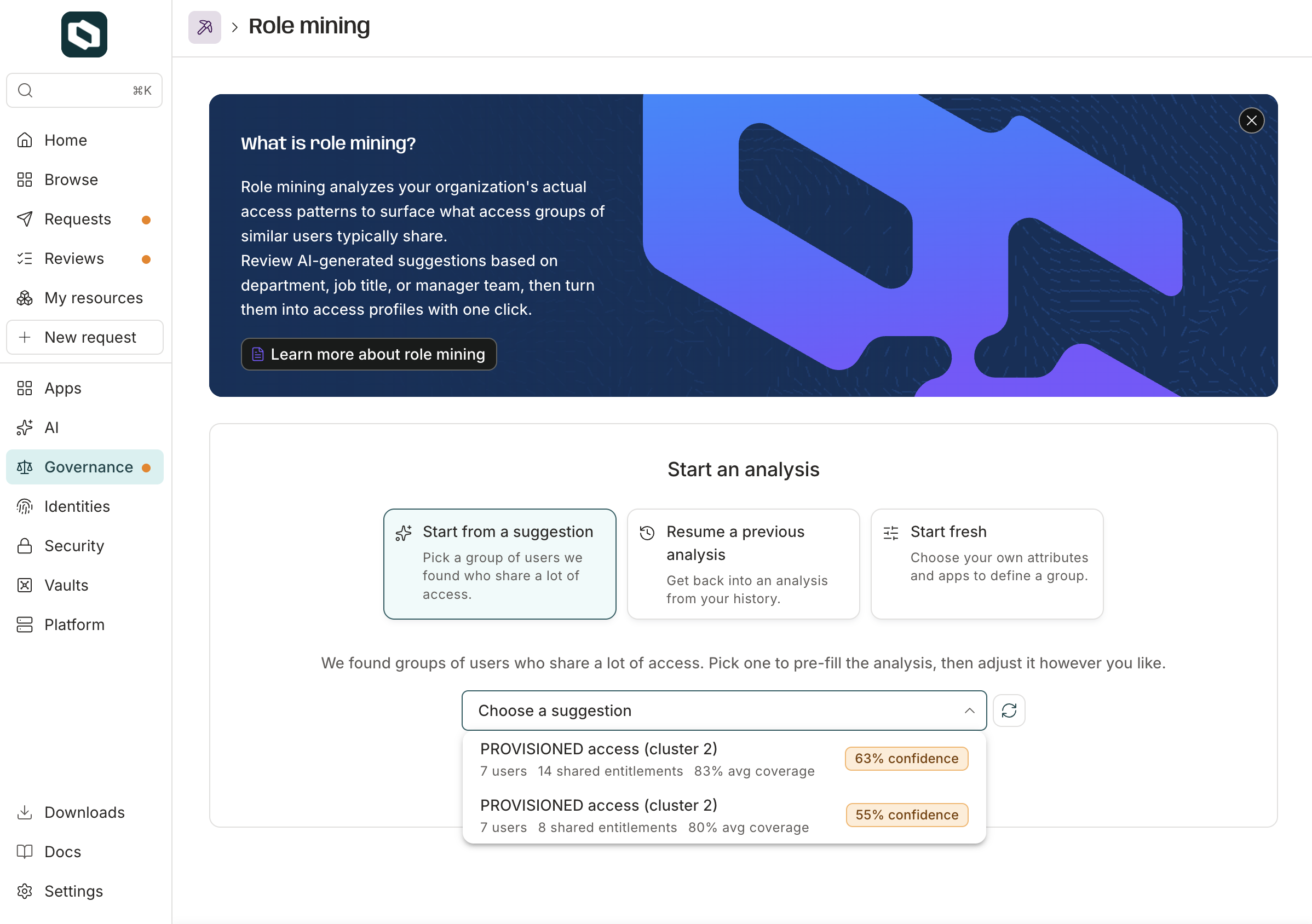
The suggestions list shows each group's user count, shared entitlements, and confidence score.
Give your team the right access from the start#
Say your support team is hiring to keep up with a growing customer base. Every new rep needs the same Zendesk, Slack, and Salesforce access. That's one ticket per app per rep, all landing on IT at once, while new hires spend their first days waiting on access instead of answering customers.
With C1, your IT or security admin just opens the Role Mining page and selects the refresh icon. C1 scans your org for common access patterns, and suggestions populate in the suggestions list. "Support Specialist," the title your new reps share, is one of them. It has an 85% confidence score.
With that confirmation, the admin selects Start, then Create role, and creates a Support Specialist access profile, built from the entitlements Support Specialists commonly hold.
From then on, new reps start with the Support Specialist profile, so onboarding is faster and the same for everyone. Each rep only has to request the extras, and admins spend less time on routine asks.
The rest of the support team's lifecycle is covered too. C1.ai joiner-mover-leaver workflows fire from HR events, so when a rep moves to another team or leaves the company, their access is adjusted or revoked the moment it's no longer needed, with no tickets.
Keep roles current as teams change#
Six months later, support has grown enough to need a second tier. Leadership creates a Tier 2 escalations team to handle the hardest customer issues, puts it under a new manager, and gives its members a new title: Support Engineer.
Support Engineers do different work than Support Specialists, so they need different access. They triage bugs in Jira and dig through a logging tool to investigate customer issues. Tier 1 Support Specialists don't use either of these tools.
So the admin goes back to the Role Mining page and refreshes the suggestions again. Support Engineer shows up as a new suggestion, along with the new manager's team. The admin creates a Support Engineer profile, everyone gets access, and the next Support Engineer you hire starts with access built from what the escalations team actually uses.
You don't have to rebuild anything from memory. As teams, titles, and tools change, you can generate fresh suggestions to find new groups worth analyzing. And when a Support Specialist is promoted to Support Engineer, C1.ai policies adjust their access based on the new role and attributes, so least privilege holds without manual rework.
Scale roles across your org#
Role Mining Suggestions help you move more groups into access profiles faster. Once a group is there, access is granted automatically by attribute instead of by ticket, which is where teams see real ROI from identity governance.
That's the idea behind the C1 Identity Platform: governance that gets lighter as the environment grows. You govern every identity on one platform and automate the repetitive work, so your team spends its time on the work that matters.
Role Mining Suggestions show you where to start. Access profiles define how that access is granted. The rest of C1.ai keeps it governed from a new hire's first day to their last, with most deployments live in just a few weeks.
See Role Mining Suggestions in action. Book a demo.