
IAM vs. RBAC: Key Differences Explained



IAM and RBAC are easy to conflate. They cover similar territory, deal with related problems, and often come up in the same buying conversations.
But they operate at different levels of your access management stack, and understanding that difference helps you make better decisions about both.
-
IAM is the broader framework for managing identities and controlling access across your organization.
-
RBAC is one method within that framework for assigning permissions based on job roles.
It might sound like a semantic difference, but it plays a big part in how organizations handle access day to day.
According to the Verizon 2024 Data Breach Investigations Report, roughly half of all data breaches trace back to compromised credentials and weak access controls. So when teams treat IAM and RBAC as interchangeable, they tend to miss gaps in one while over-relying on the other.
This guide breaks down how the two differ, where they overlap, and why a strong access management strategy needs both.
What is identity and access management (IAM)?#
Identity and access management (IAM) is a framework that governs how organizations manage user identities and control access to systems, applications, and data.
It spans the full lifecycle of a user's identity, from the moment someone joins the company to the day they leave, and every access change in between.
Most IAM frameworks break down into four key areas:
-
Identity lifecycle management – how accounts get created, updated, and removed
-
Authentication – how users prove they are who they claim to be
-
Authorization – how you determine what each user can and can't access
-
Governance and compliance – how you audit, review, and report on all of the above
Example → A new engineer joins your company. IT creates their account, assigns them to the engineering team, and sets up MFA. They get access to code repositories and internal tools, but not to production infrastructure or financial systems. Six months later, they move to a platform team. Their permissions update to match, and their old access goes away. When they leave, every account tied to their identity gets revoked.
The authorization piece, specifically how organizations assign permissions based on job roles, is where RBAC comes in.
What is role-based access control (RBAC)?#
Role-based access control (RBAC) takes a role-first approach to permissions. You define user roles based on job functions, attach specific permissions to each one, and then assign users to the roles that match their responsibilities. Two people in the same role get the same access.
The basic structure of RBAC comes down to a few components:
-
Roles – predefined groups based on job function, department, or responsibility level
-
Permissions – specific actions a role is allowed to perform (read, write, delete, approve)
-
Users – individuals assigned to one or more roles
-
Constraints – rules that limit how roles interact, like preventing one person from holding two conflicting roles
Example → Your support team has a tiered structure. Tier 1 agents can view tickets and respond to customers, but can't issue refunds or access billing data. Tier 2 leads can do both. Assign a new hire to the Tier 1 role, and their permissions are already scoped. Promote them to Tier 2, and their access updates with the role.
RBAC is one of the most widely used methods for handling authorization within an IAM framework. It works well when roles are clearly defined and reviewed on a regular basis. When they aren't, permissions start to pile up.
IAM vs. RBAC: Key differences#
These two aren't an either-or decision. RBAC operates inside the broader IAM strategy and handles one specific function within it. But they overlap enough in practice that it's worth pulling them apart to see exactly how they differ.
| Dimension | IAM | RBAC |
|---|---|---|
| Scope | A broad framework that covers identity, authentication, authorization, and governance | Focused specifically on authorization through role-based permissions |
| What it controls | The full user lifecycle, from account creation to offboarding | Which resources a user can access based on their assigned role |
| How permissions work | Supports multiple models (RBAC, ABAC, policy-based, etc.) | Assigns permissions to roles, then assigns users to those roles |
| Granularity | Can apply access decisions down to individual user actions, attributes, or contextual factors | Grants access at the role level, so everyone in a role gets the same permissions |
| Flexibility | Can adapt to complex, context-based access decisions | Works best when IAM roles are stable and well-defined |
| Time-based access | Can support temporary or just-in-time access through policy workflows | Permissions are generally static and persist for as long as someone holds a role |
| Relationship to least privilege | Provides the tools and workflows to enforce the principle of least privilege across the organization | Supports least privilege when roles are tightly scoped, but can work against it when roles become bloated |
| Access reviews | Typically automates periodic access reviews and certification campaigns | Depends on someone manually reviewing whether roles and their permissions are still appropriate |
| Who manages it | Usually owned by IT or cybersecurity teams at a centralized level | Roles are often defined and maintained by department leads or system admins |
| Compliance role | Provides audit trails, access reviews, and reporting across all access | Supports compliance by keeping permissions structured and repeatable |
| Scale | Spans every system, application, and environment in the organization | Applies within specific systems or across systems, depending on implementation |
Scope is the most important difference here. IAM touches every stage of a user's relationship with your systems, while RBAC only comes into play at the authorization step, after a user has already been created and authenticated. You can run IAM without RBAC by using a different authorization model, but you can't run RBAC without some form of IAM around it.
Flexibility is another difference worth noting. RBAC works well when your org has clearly defined roles with predictable access needs, but it can get rigid when access decisions depend on context like location, time of day, or risk level. IAM frameworks can bring in other models like ABAC (attribute-based access control) to cover those scenarios.
Example → A mid-sized SaaS company uses an IAM platform to manage identities across Okta, AWS, and GitHub. When a new developer joins, the IAM system provisions their account, enforces multi-factor authentication (MFA), and assigns them to the "backend engineer" role. RBAC takes over from there. That role grants access to specific repositories, staging environments, and internal documentation. If that developer later needs temporary access to a production database for an incident, the IAM platform handles it through a separate policy-based workflow, outside of RBAC entirely.
The confusion between IAM and RBAC makes sense given how closely the two are connected. But once you see RBAC as one piece of a larger IAM framework, you start to evaluate tools differently, ask better questions about policy, and recognize where role-based permissions alone fall short.
Quick test: is it IAM or RBAC?
- Creating, disabling, or removing a user account → IAM
- Verifying someone's identity at login → IAM
- Assigning permissions based on job role → RBAC
- Changing what a user can do when they switch teams → RBAC
- Running a periodic access review → both
- Revoking all access when someone leaves → both
Why you need both IAM and RBAC#
The differences between IAM and RBAC are clear enough on paper. But all of that becomes a lot more tangible when you look at what happens when organizations lean too heavily on one and neglect the other. We'll cover the two most common scenarios.
In the first scenario, an organization has RBAC but no strong IAM framework around it. Roles exist, permissions are assigned, but there's no system to maintain any of it over time. This leads to:
- Roles that get created but never reviewed or updated
- Former employees retain access because there's no automated deprovisioning
- One-off roles that get spun up for edge cases and never cleaned up
- Permissions piling up inside roles that nobody audits
- The appearance of a structure with none of the oversight behind it
The opposite situation is less common but creates its own headaches. An organization has an IAM platform that handles identity and authentication, but permissions get assigned ad hoc with no consistent model behind them**.** Without RBAC or something similar:
- Access requests get handled one by one with no repeatable process
- Managers approve permissions based on what feels right in the moment
- Audits take forever because there's no role structure to review against
- New hires on the same team end up with completely different permissions
- The framework covers identity and governance, but authorization is a free-for-all
Together, they balance each other out. RBAC gives your permissions a clear, repeatable structure. IAM brings the machinery to enforce that structure at scale, from automated provisioning and deprovisioning to scheduled access reviews and compliance reporting.
Example → A company with 500 employees uses RBAC to define roles across engineering, finance, and customer support. Each role carries a specific set of permissions. Their IAM platform automates provisioning when someone joins, updates permissions when someone changes teams, runs quarterly access reviews to flag stale roles, and revokes access the day someone leaves. RBAC provides the structure, while IAM makes sure that structure doesn't decay over time.
PRO TIP 💡: C1.ai addresses both of these scenarios. It gives RBAC-only organizations the governance layer they're missing, including automated access reviews, lifecycle management, and real-time access mapping. And it gives IAM-heavy organizations the structured, policy-driven authorization model they need to stop handling permissions on a case-by-case basis.
How IAM and RBAC work together#
The previous section covered why IAM and RBAC need each other. This one looks at how they interact in practice, specifically how the two hand off to each other at every stage of the access lifecycle:
-
Provisioning → A new employee's identity gets created and authenticated (IAM), then they get assigned to a role that determines their permissions (RBAC).
-
Day-to-day access → The user verifies their identity at login (IAM) and receives access based on their assigned role (RBAC).
-
Role changes → The transition gets triggered and processed (IAM), and permissions update to match the new role (RBAC).
-
Access reviews → Periodic reviews get scheduled and automated (IAM), and the roles and permissions attached to them are what get evaluated (RBAC).
-
Offboarding → The user's identity gets deactivated across every system (IAM), including every role assignment and permission tied to it (RBAC).
The value of this handoff is that no single stage depends on someone remembering to do something manually. IAM automates the workflow, RBAC keeps the permissions structured, and the two keep each other in check at every step.
Signs your IAM-to-RBAC handoff is broken →
- New hires wait days for access because provisioning depends on manual ticket processing
- People keep old permissions after switching teams because no one updates their role assignment
- Offboarded employees show up in access logs weeks after their last day
- Managers copy permissions from existing team members instead of assigning a predefined role
- Access reviews keep flagging the same stale permissions quarter after quarter because nobody acts on the findings
Common challenges and limitations#
Even with both IAM and RBAC working together, access management isn't a set-it-and-forget-it situation. Each side comes with operational challenges that get harder to ignore over time.
On the RBAC side:
-
Role explosion: Edge cases lead to new roles. New roles lead to more edge cases. Over time, the number of roles multiplies until nobody can tell you what half of them do.
-
Static roles in dynamic environments: RBAC assumes fairly stable job functions. Cross-functional projects, temporary assignments, and contractor access don't fit neatly into predefined roles.
-
Permission creep: People accumulate access as they move through the organization. New roles get added, but old ones don't get removed, so users end up with far more permissions than they need.
On the IAM side:
-
Governance overhead: Maintaining role definitions, running access reviews, and cleaning up stale permissions all take time and resources. Many teams invest heavily in the initial rollout but don't account for how much work it takes to keep everything accurate as the organization evolves.
-
Multi-system complexity: Most organizations run dozens of tools and platforms, each with its own way of handling permissions. Getting IAM policies to apply consistently across all of them is difficult, and some systems don't support standardized access models at all.
-
Limited visibility: Many teams also don't have a complete picture of who can access what across their full stack. Without that clarity, access reviews rely on incomplete data, and governance stays one step behind.
Recommended read → 4 Modern IAM Challenges & How to Solve Them
These challenges don't go away on their own, and most teams don't have the bandwidth to manage them manually. The right tooling makes the difference, which is what we'll cover next.
Moving beyond static roles with C1.ai#
The framework is only as strong as the tooling behind it. Without automation, a clear view of who has access to what, and a reliable way to keep policies in check, even well-designed roles start to degrade as the organization grows.
C1.ai picks up where strategy leaves off. It's an identity security platform that brings your IAM and RBAC workflows together, automates the work that most teams fall behind on, and keeps access clean across every connected system.
Here's exactly what C1.ai brings to the table:
-
Unified Identity Graph: C1.ai connects to every system in your environment, from cloud and SaaS apps to on-prem infrastructure and homegrown tools, and maps every identity and permission into a single, continuously updated view.
-
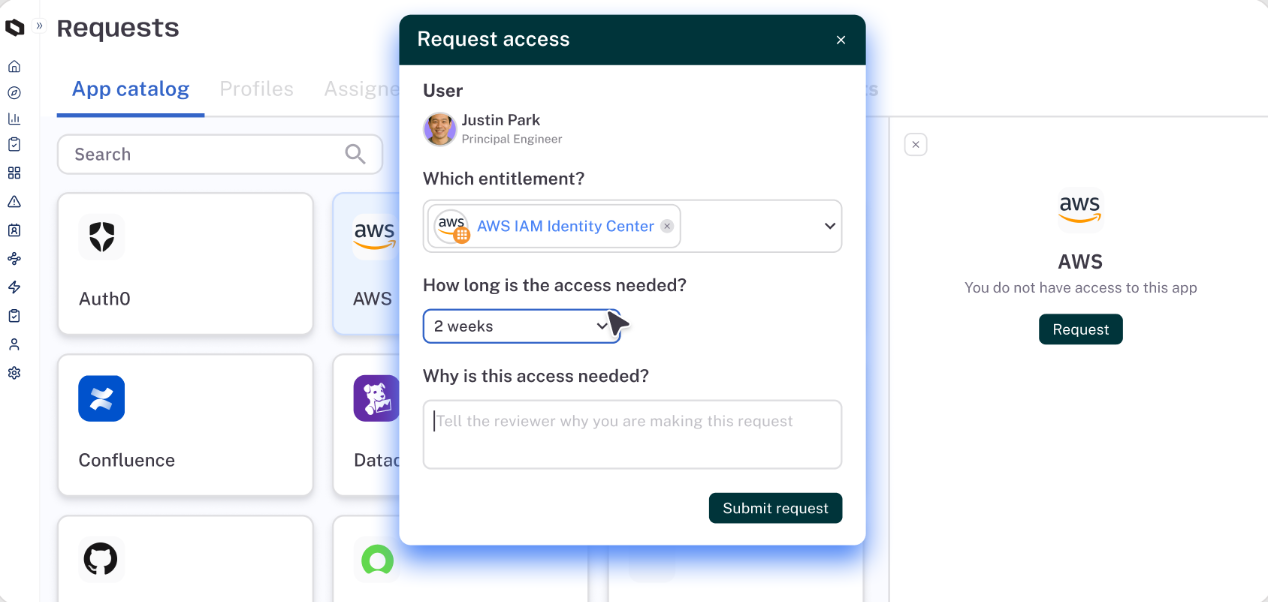
Just-in-time access: Users can request access for a specific time window tied to a task or project. When the window expires, permissions get pulled back automatically. Teams don't need to remember to clean up after themselves.
-
Intelligent access reviews: C1.ai handles the full access review lifecycle, from scheduling and assignment to follow-ups and revocations. Each review brings AI-driven context about the user, their access history, and potential risk factors.
-
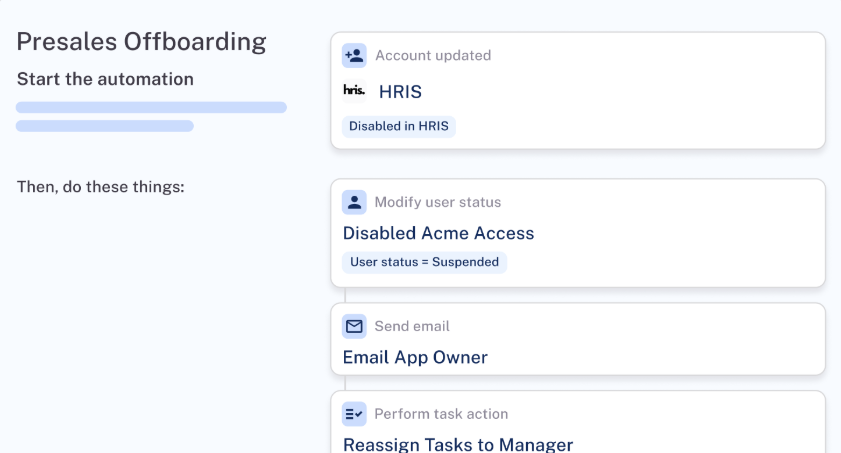
Identity lifecycle management: The platform takes care of account creation, permission assignments, and deprovisioning across every connected system as people join, change roles, or leave the organization. When an engineer moves from backend to platform, their old permissions get removed, and new ones get applied without anyone filing a ticket or nudging IT on Slack.
-
Dynamic access controls: Not every access decision fits neatly into a predefined role. C1.ai supports policy-driven controls that can factor in job function, trust signals, risk level, and other contextual attributes when granting or restricting access.
-
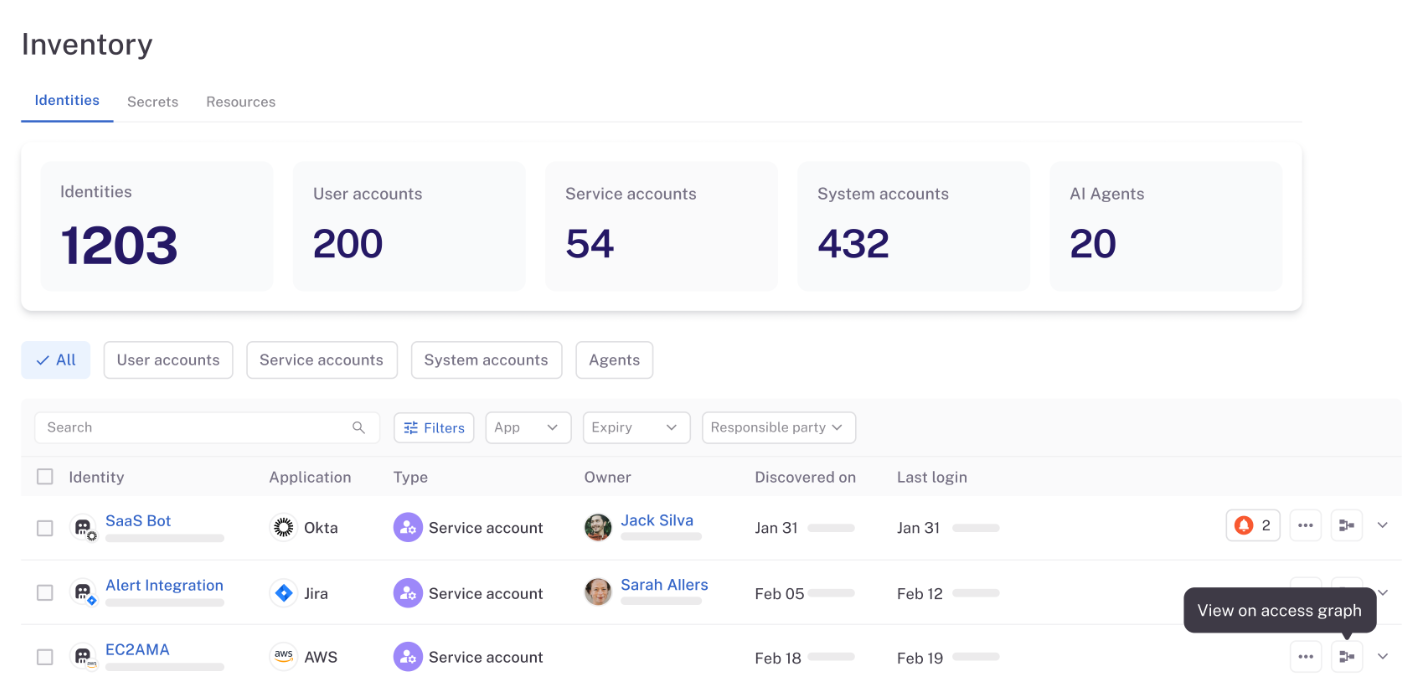
Non-human identity governance: Service accounts, API keys, tokens, and AI agents are multiplying fast in most environments, and they often fly under the radar when it comes to access governance. C1.ai discovers and inventories all of them, maps each one to a responsible owner, and points out security posture risks the same way it would for a human user.
-
AI-powered helpdesk automation: The C1.ai AI agents manage routine access requests end to end, from intake to approval to provisioning, without a human having to get involved. Requests that involve sensitive systems still get routed to a human reviewer, but the bulk of everyday access requests get resolved automatically.
-
Broad connector ecosystem: C1.ai ships with hundreds of pre-built connectors that cover SaaS, cloud infrastructure, on-prem systems, and custom-built internal tools. Most teams get fully connected within a few weeks without a heavy implementation project.
C1.ai makes sure both IAM and RBAC hold up over time by automating the work that most teams can't keep pace with manually.
Book a demo to see how C1.ai can help your team.
FAQs#
What is the difference between ABAC and RBAC?#
RBAC assigns permissions based on predefined roles. If you're a marketing manager, you get the same system access as every other marketing manager.
ABAC takes a more granular approach and evaluates attributes like job function, location, device type, or time of day before granting user access. So instead of a blanket role, the system checks multiple factors in real time to decide whether a specific user should have access to a specific resource at that moment.
Most organizations use RBAC as a baseline and bring in ABAC when they need more context-aware access decisions.
Does RBAC help with HIPAA compliance?#
Yes. HIPAA requires organizations to limit access rights to protected health information (PHI) based on job function, and RBAC aligns directly with that requirement.
By assigning permissions through specific roles, you can make sure that a billing coordinator only sees billing data, a nurse only accesses patient records relevant to their unit, and an IT admin never touches clinical information at all.
That said, RBAC alone doesn't cover everything HIPAA demands. You still need authentication controls, audit logging, access reviews, and policies for handling exceptions, which is where a broader IAM strategy comes in.
How does IAM support Zero-Trust security?#
Zero Trust operates on the principle that no user or device should be trusted by default, regardless of whether they're inside or outside the network. IAM is one of the primary ways organizations put that principle into practice.
It authenticates users at every login, applies the right level of user permissions based on their role or attributes, enforces MFA, and monitors access patterns over time.
The system can reassess trust throughout a session based on factors like device health, location, or behavior patterns. Without IAM handling identity verification, authentication, and authorization, zero trust has no mechanism to decide who gets in and who doesn't.
Can you automate RBAC provisioning?#
Yes. Most modern IAM platforms can automate RBAC provisioning so that when someone joins the organization or changes roles, the system assigns the right role and permissions automatically.
Instead of IT manually creating accounts and selecting permissions for each new hire, the platform pulls from HR data or directory attributes, matches the user to a predefined role, and provisions access across every connected system.
The same applies in reverse. When someone leaves or switches teams, the platform revokes or updates their role-based permissions without anyone filing a ticket.
What does implementing RBAC look like in real-world environments?#
Most teams start by mapping out a role hierarchy that reflects how their organization operates day to day. You find common use cases across departments, define which sensitive data each role needs to touch, and set fine-grained permissions so users only get granted access to what their job requires.
During onboarding, new hires get assigned to a role and receive the right permissions automatically. The goal is a structure that stays scalable as headcount grows and doesn't introduce vulnerabilities through over-permissioned roles or one-off exceptions that never get cleaned up.
How do platforms like Azure AD and AWS IAM handle RBAC?#
Microsoft Azure AD and AWS IAM both support role-based access control, but they approach it differently.
- Azure AD manages digital identities across the Microsoft ecosystem and lets admins assign roles through a centralized dashboard, with built-in support for single sign-on (SSO) across connected apps.
- AWS IAM uses policies and groups to control access to cloud resources, with roles that can be scoped to specific services or accounts.
Both platforms help streamline permissions at scale, but most organizations still need a dedicated identity governance layer on top to handle access reviews, lifecycle management, and cross-platform visibility.