


Today, AI Access Management is generally available for all C1.ai customers. Every organization can now govern how employees, personal AI assistants, and enterprise agents access the tools and data they work with — at the speed AI actually moves.
The setup problem no one talks about#
Organizations are racing to adopt AI, but the path to connecting agents to real enterprise data was never designed for this moment. Credentials end up in Slack messages and .env files. Service accounts multiply without owners. Security teams lose visibility on what's connecting to what, on whose behalf, with what permissions. And the employees who need AI the most, non-technical teams without engineering support, simply give up and find their own workarounds.
This creates Shadow AI. This is what happens when the governed path is too slow.
The governed path, now the fastest path#
AI Access Management makes the secure option the easy option.
With AI Access Management, end users request access to the AI tools they need and are provisioned in under 60 seconds through self-service provisioning — while IT and security maintain full visibility and policy enforcement.
How can I use this?#
The easiest way to understand AI Access Management is to see where it changes the outcome.
The developer who hits an access wall mid-session. A developer is working in Cursor and gets a permissions error trying to pull data from an internal system. The old path: context-switch to a portal, file a request, wait. With AI Access Management, the agent detects that the user doesn't hold the entitlement, submits a request on their behalf through C1.ai, and routes it for approval — all without the developer leaving their session. If the policy allows self-approval, it resolves in seconds. They stay in flow.
The sales ops team paying for licenses no one needs. A sales operations analyst needs to pull Salesforce account data for a quarterly review. They do this once a month. That doesn't warrant a $150/month seat — but without one, the data is out of reach. Through the C1.ai shared credential model, they get governed, read-only access to Salesforce via the MCP gateway without a direct license. Scoped to exactly the tools they need, audited every time they use it, and revocable the moment the business need changes.
The security team watching shadow AI spread. 78% of employees who use AI tools bring their own. Most of their security teams don't know it. AI Access Management gives security teams visibility into what AI tools are running across the organization and a path to bring them under governance — without shutting down the adoption that leadership is demanding. The same policy engine that governs human access governs agent access. There's no separate program to build.
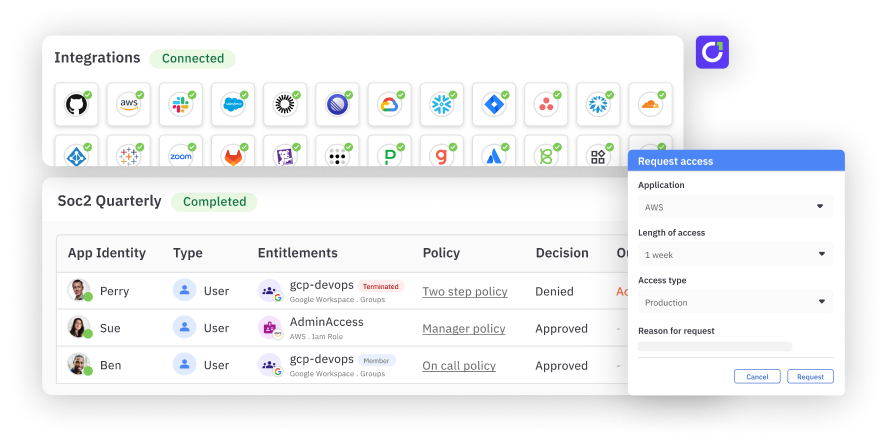
The compliance team preparing for an audit. An auditor asks how the organization governs AI tool access. With AI Access Management, the answer isn't a shrug. Every tool call is logged with full identity context — who made the call, what client they used, which tool was invoked, which policy authorized it. MCP entitlements surface in the same access review campaigns as human entitlements. SOC 2, GDPR, and HIPAA evidence is a report, not a scramble.
How it works#
The user experience#
A marketing manager opens their AI client and needs to pull Salesforce data for a report. They don't have a Salesforce seat. In the past, that conversation ended there, or it ended with a shadow integration that no one could see.
With AI Access Management, the agent searches C1.ai to determine whether the user holds the relevant entitlement. If they don't, the agent discovers that it exists, submits a request on the user's behalf, and routes it through the appropriate approval workflow — all without the user leaving their agentic session. They never navigate to a portal. They never complete MFA in a browser they can't figure out. The request happens where they already are.
If the entitlement request is approved, the user's access profile is provisioned, their OAuth token is stored in the C1.ai vault, and their agent begins calling tools through the C1.ai MCP gateway. They never see the credential. It never touches their machine.
The admin setup#
On the administrative side, the workflow is intentional and sequential. An admin registers an MCP server — either from the C1.ai 3,000+ server catalog or by providing a URL directly. C1.ai connects to the server, discovers all available tools, and surfaces them for review.
The admin classifies each tool: read, write, destructive, or sensitive. That classification determines what policy gets applied when a user's agent tries to invoke it. Approved tools are grouped into access profiles — named collections of tool entitlements that can be made requestable in the catalog. "Salesforce Read-Only for Sales Team." "Google Analytics Full Access." "Gong Transcript Viewer." These become the units of access that users request and managers approve.
The approval flow#
Policy enforcement is real-time and inline. When an agent attempts a tool call, C1.ai evaluates the policy attached to that entitlement before the call goes through.
Read actions on non-sensitive data can be set to auto-approve — no user interruption, but every action still logged and auditable. Write actions can trigger a self-approval flow: the user receives a Slack or Teams message, taps approve, and the call proceeds. That approval is valid for a configurable window (an hour, a day, a week), after which the user is notified again if the agent attempts a similar action. Destructive actions can be denied outright.
The self-approval model is the critical design choice here. It keeps the human in the loop without destroying the agentic experience. The user doesn't have to leave their session. The action is accountable. And the audit trail captures the whole story.
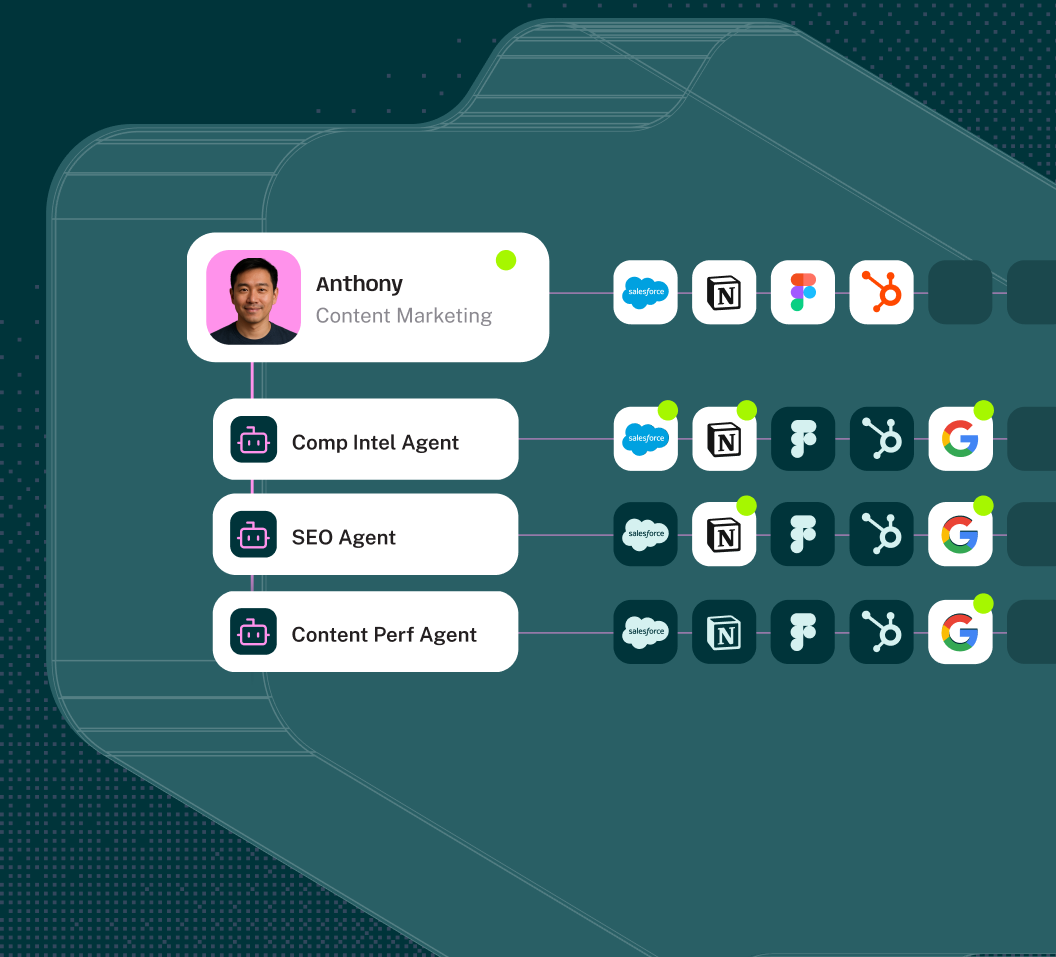
For enterprise agents — the ones running autonomously in SOC pipelines, help desks, and automation workflows — C1.ai manages them as service principals. Each agent has its own identity in the platform, an owner, a manager, approvers, and its own set of entitlements. It goes through access reviews on the same schedule as human identities. It's a digital employee, and its access is governed like one.
The audit trail#
Every tool invocation through the C1.ai MCP gateway is logged with full context: who made the call (user and client), what was called (tool name and parameters), when, which MCP server was involved, which grant authorized the action, and the data classification of the resource involved. That log can route to S3, a SIEM, or a SOAR.
From an access review perspective, MCP entitlements surface alongside the rest of a user's access in standard certification campaigns. There's no separate AI governance workflow. When a reviewer certifies a user's access, they see the full picture — human entitlements and agent entitlements together, on the same record, in the same campaign.
What comes next#
AI Access Management is generally available today. Enterprises are navigating AI adoption in real time, and the tooling to govern that adoption needs to move at the same speed. The work ahead is to extend that governance deeper with C1.ai as the identity infrastructure layer for the agentic enterprise, where every tool, every policy, and every identity, whether human, non-human, or AI, is governed through a single platform. AI Access Management is how that vision becomes operational.
AI Access Management is available to all C1.ai customers today. Book a demo to see it in action.