



Every organization is racing to adopt AI. Business leaders are pushing teams to integrate agents into their workflows, connect to live data, and unlock the productivity gains that justify the investment. But the reality on the ground looks different. Engineers are spending days configuring service accounts. Employees are storing API tokens in .env files on their laptops. And security teams are watching a new wave of unmanaged, ungoverned access sprawl across the enterprise.
We built AI Access Management because we ran into this problem internally. Our marketing team wanted to connect Claude Desktop to Google Analytics. Simple goal. The setup required Python, GCP service accounts, and three days of back-and-forth with engineering. That experience was the signal: this is happening everywhere.
Since launching, we have talked to dozens of security, IT, and GRC teams about what they are seeing, what concerns them, and what they actually need. Here are the questions that keep coming up.
What is AI Access Management?#
AI Access Management is a product extension of the C1.ai identity governance platform that governs how AI agents access enterprise data and tools. At its core is an MCP gateway that authenticates users, authorizes agent actions in real time, and enforces policy-driven access decisions. All of it is embedded directly into the IGA platform you already use for human identity governance.
The short version: your agents get the access they need. Your security team gets the visibility and control they need. No one has to choose.
Why does this need to exist? Can't teams just use the MCP servers on GitHub?#
They can. And a lot of people are. But those vibe-coded MCP servers are the modern equivalent of downloading random software from a pop-up ad in the '90s. There are thousands of them out there, often poorly documented, sometimes outright sketchy from a supply chain perspective. Security teams are already fielding requests from developers who want to install their own MCP integrations. It is popping up everywhere, and it is not going to slow down.
When you connect a native MCP server directly to your agent, that agent inherits your full set of entitlements in the target application. There is no separation between your human access and your agent's access. If you can delete records in Salesforce through a browser, your agent can too. Period.
The C1.ai MCP gateway changes that equation. We broker the connection, store the credentials in our vault (not on your laptop), and enforce granular policies on what your agent can and cannot do, independent of your standing human access.
The goal is to make the governed path the easiest path. If the secure option is also the fastest, lowest-friction option, people will use it. And they will stop reaching for random GitHub MCPs because they do not need to.
How does it actually work?#
When you connect your agent to the C1.ai MCP endpoint, whether that is Claude Code, Claude Desktop, Cursor, Cortex, or another harness, a few things happen.
Authentication. C1.ai identifies who you are, what team you are on, and what harness you are using. Every action your agent takes is logged back to you, in the context of the specific agent making the call.
Dynamic tool exposure. Your agent does not see every tool available in the system. It only sees entitlements you are eligible to request or already hold. This is critical. Giving an agent too much information about what exists in your environment is how you get creative, and dangerous, behavior.
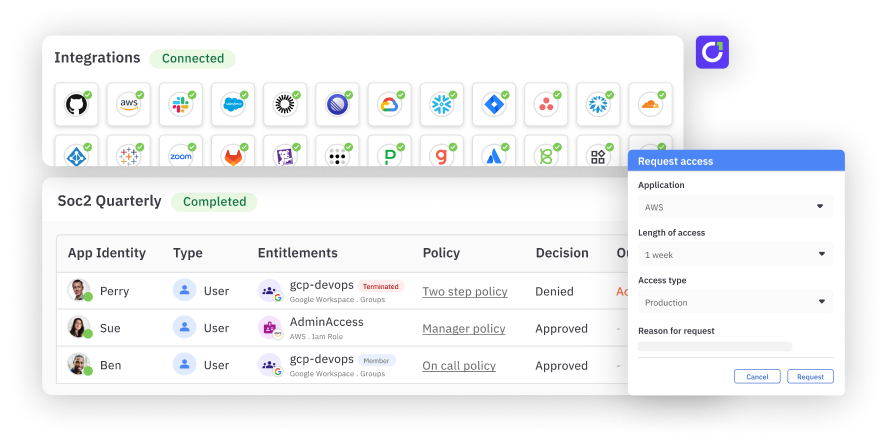
Real-time policy enforcement. When your agent tries to take an action, C1.ai enforces policy inline. Read actions on non-sensitive data can be auto-approved. Write actions can trigger a self-approval flow. Delete actions can be denied outright. You define the policies. The platform enforces them.
All of this happens through a single MCP connection from your agent to C1.ai. One connection, all your tools, regardless of whether the target system lives in the public cloud or behind your firewall.
What happens if a user does not have access to the data their agent requests?#
The agent searches C1.ai to determine whether the user holds the relevant entitlement. If they do, the agent proceeds based on the policy attached to that entitlement (auto-approve, self-approve, manager approve, etc.). If they do not, the agent can discover that the entitlement exists, submit a request on the user's behalf, and route it through the appropriate approval workflow.
If the user is not eligible to request the entitlement at all, the agent falls back gracefully: it gives the user directions on how to get help, suggests opening a ticket, or provides a link to the relevant documentation. No dead ends. No confusion.
Where do API tokens and credentials live?#
In the C1.ai vault. Not in a text file. Not in a Slack message.
C1.ai supports two credential models:
Shared credentials. A purpose-built API token stored in the C1.ai vault with scoped, limited permissions in the target application. When a user makes a call through the MCP gateway, C1.ai brokers the connection using that token. The user never sees it, never manages it, and cannot extract it. When they leave the company, the access disappears with their identity.
Personal credentials. The user authenticates to the target application through C1.ai, and their OAuth token gets stored in the C1.ai vault. Every call their agent makes is logged as them. They do not have to manage token refresh or expiration. It is part of the service.
Both models keep credentials off endpoints and out of config files. Both give security teams a single point of control and visibility.
How is agent access different from human access?#
This is the most important architectural decision in the product. Agent entitlements are separate from human entitlements.
If you log into Salesforce in a browser, you might have full read-write-delete access. That is standing human access. But when your agent connects to Salesforce through C1.ai, it operates under a different, constrained set of entitlements that your organization defines.
A read action might be automatic. A write action might require self-approval in Slack. A delete action might be denied entirely. The entitlements, the policies, and the approval workflows are all independent of what the human can do in a browser session. They are related, they are connected to the same human identity, but they are not the same.
That separation matters. The Salesforce problem is a good example: technically, every user with API access to Salesforce has always had the ability to curl data from endpoints. Nobody did it because it was not practical. AI agents made it practical overnight. The access was always available. It just was not being taken advantage of. Agents changed that equation, and now the blast radius of any given credential is significantly larger.
What does the approval flow look like?#
Self-approval is the most critical component of the agentic identity story, and it is about low friction and accountability.
Here is the flow: your agent tries to write to Salesforce. You get a Slack or Teams message that says your agent is trying to take a write action. Do you approve? You tap yes. There is now an audit trail that says the agent attempted the action, you approved it, and the approval is valid for whatever duration your policy specifies (an hour, a day, a week). The next time your agent attempts a similar action after the approval expires, you get notified again.
You never leave your agentic context. You never navigate to a browser, log into an IDP, complete MFA, and land on a web page you cannot figure out. That has been the IGA experience for too long. The approval happens where you already are.
And for read-only actions on non-sensitive data, approval can be automatic. No interruption at all. The action is still logged and auditable, but the user is not interrupted.
What about enterprise agents that run autonomously?#
Enterprise agents, the ones in your SOC, your help desk, your automation pipelines, are actually the easier piece of this problem. They are well-defined. They have predictable use cases and standing access to a set of systems. They should be fairly static.
C1.ai supports these through service principals: a local identity in the platform that has an owner, a manager, approvers, and its own set of entitlements. It goes through access reviews just like any human identity. It is a digital employee, and its access should not be treated independently of the humans responsible for it.
The harder problem, and where the C1.ai real-time policy engine shines, is personal agents. When a human is at the keyboard, the questions they ask are unpredictable. They are going to ask their agent to do things no one anticipated. That is where dynamic policies, just-in-time access, and real-time enforcement become essential.
Can this save us software licenses?#
Yes. This is one of the most compelling use cases we are hearing from customers.
With a shared credential model, you can give five people read-only access to Salesforce data through the MCP gateway without giving them a Salesforce seat. They query the data they need through their agent, scoped to a constrained set of tools, and never log into the application directly. No seat, no license cost, no accidental data exposure in a browser session. A very constrained surface area.
The same logic applies to billing permissions, admin access, and any entitlement that has traditionally required a full license. If someone only needs to query account information once a month, an MCP entitlement through C1.ai is a better fit than a standing seat in the application.
What about logging, auditing, and compliance?#
Everything that flows through the C1.ai MCP gateway is logged. Every tool call, every approval, every denial. C1.ai can capture the full request body and response body and route those logs to S3, a SIEM, a SOAR, or other analytics infrastructure.
From an access review perspective, MCP entitlements roll up to the human identity. When you run a user access review campaign, the agent entitlements surface alongside the human's other entitlements. There is one record. There is one audit trail. The access review does not become a separate problem.
C1.ai is also building support for hooks: the ability to intercept data in transit and send the request or response body to a DLP tool or other data classification infrastructure. If your organization already has tooling for analyzing data movement, C1.ai can feed into it.
Is this a separate product? Do we need a new contract?#
No. AI Access Management is not a separate module. It is the same C1.ai platform you already use for identity governance. The policies, the access profiles, the approval workflows, all the same primitives. The only thing that is new is the interface. Instead of a browser, it is an MCP connection.
Licensing for MCP usage is consumption-based rather than seat-based, which means you can start using it without trying to forecast volume you do not yet understand. Use it as needed.
What are you building next?#
The vision is straightforward: make C1.ai the identity infrastructure layer for the agentic enterprise. One connection. Every tool. Every policy. Every identity, whether it is human, non-human, or AI.
Ready to see it in action? Book a demo.