
10 Best Identity and Access Management (IAM) Tools in 2026



Identity and access management (IAM) is the backbone of modern cybersecurity. It governs who can access what across your organization—spanning cloud apps, on-prem infrastructure, APIs, and everything in between. As enterprises scale, adopt multi-cloud architectures, and onboard non-human identities like service accounts and AI agents, choosing the right IAM tooling has never been more consequential.
This guide breaks down the distinct categories of IAM, highlights the features that matter most in 2026, and ranks the 10 best IAM tools on the market today—so you can find the right fit for your organization's maturity, security posture, and growth trajectory.
Types of IAM Tools#
Not all IAM tools solve the same problem. The category has evolved into several distinct disciplines, each addressing a specific layer of the identity and access lifecycle. Understanding these categories is the first step toward building a stack that actually fits your needs.
Single Sign-On (SSO) / Identity Providers (IdP) — These platforms authenticate users and provide a single set of credentials to access multiple applications. They are foundational to any IAM stack, reducing password fatigue and centralizing authentication. Examples include Okta, Microsoft Entra ID, and Ping Identity.
Identity Governance and Administration (IGA) — IGA tools go beyond authentication. They manage the full identity lifecycle—provisioning and deprovisioning, access reviews, separation of duties, and audit reporting. IGA is where compliance and operational efficiency meet. C1.ai and SailPoint are leading examples.
Privileged Access Management (PAM) — PAM solutions focus on securing, monitoring, and auditing access to critical systems by privileged users. They manage credentials for admin accounts, enforce session recording, and provide just-in-time elevation. CyberArk is the market leader in this space.
Cloud Infrastructure Entitlement Management (CIEM) — CIEM tools analyze and right-size cloud permissions across AWS, Azure, GCP, and other providers. As organizations move to multi-cloud, CIEM helps eliminate excessive standing privileges that traditional IAM tools miss.
| Category | What It Does | When You Need It | Example Tools |
|---|---|---|---|
| SSO / IdP | Centralizes authentication across apps | Day one—every organization needs an IdP | Okta, Microsoft Entra ID, Ping Identity |
| IGA | Governs the full identity lifecycle with reviews, policies, and automation | When you need compliance, audit trails, or automated provisioning | C1.ai, SailPoint, Zluri |
| PAM | Secures and monitors privileged access to critical systems | When you have admin accounts, shared credentials, or compliance mandates | CyberArk |
| CIEM | Right-sizes cloud permissions and eliminates excessive entitlements | When you operate in multi-cloud and need visibility into who can do what | C1.ai, Ermetic, Wiz |
Key Features to Look for in an IAM Platform#
The IAM market in 2026 looks fundamentally different from even a few years ago. AI agents are becoming first-class identities, non-human identities outnumber humans by 10x or more in most enterprises, and zero-trust frameworks demand continuous verification rather than one-time authentication. Here are the features that separate modern IAM platforms from legacy tools.
Non-Human Identity (NHI) Management — Service accounts, API keys, tokens, certificates, and bot credentials now represent the largest attack surface in most organizations. A modern IAM platform must discover, inventory, assign ownership, and govern NHIs with the same rigor applied to human identities.
AI Agent Identity Governance — As agentic AI becomes embedded in enterprise workflows, organizations need the ability to assign identities to AI agents, define their permissions, monitor their actions, and revoke access when needed. This is the newest frontier in IAM.
Just-in-Time (JIT) Access and Zero Standing Privileges — Standing privileges are standing risk. Just-in-time (JIT) access and provisioning ensures users and services only receive the permissions they need, exactly when they need them, and those permissions expire automatically. This is a core pillar of zero-trust architecture.
Automated Access Reviews and Certifications — Manual spreadsheet-based reviews are slow, error-prone, and create reviewer fatigue. Modern platforms automate the access review cycle end-to-end, surface risk signals and usage patterns for each decision, and enforce remediation on a defined schedule.
Lifecycle Automation — From onboarding to role changes to offboarding, lifecycle automation ensures that access is provisioned and deprovisioned in real time based on HR events, role changes, and policy triggers—without waiting on IT tickets.
Deep Integration Ecosystem — Your IAM tool is only as useful as the systems it connects to. Look for platforms with hundreds of pre-built connectors spanning SaaS apps, cloud providers, on-prem infrastructure, and developer tools—plus the ability to build custom integrations.
Compliance Alignment — Support for SOX, SOC 2, HIPAA, PCI, and other frameworks helps organizations meet regulatory requirements through automated reviews, evidence collection, and audit reporting.
AI-Based Identity Analytics — Machine learning can detect anomalies, flag risky access, recommend least privilege, and help teams focus on the most urgent identity risks.
Real-Time Access Visibility — A centralized view of user identities, entitlements, and privileges across cloud and on-prem environments makes it easier to detect excessive or risky access.
Multi-Cloud and Hybrid Support — IAM should work across AWS, GCP, Azure, on-prem systems, and homegrown apps without sacrificing visibility or control.
10 Best IAM Tools in 2026#
Before diving into each tool, here is a quick-reference comparison table to help you evaluate the market at a glance.
| Tool | Primary Category | Standout Feature | Best For | Pricing | Free Trial |
|---|---|---|---|---|---|
| C1.ai | IGA + NHI Governance | AI-native governance for human, non-human, and AI agent identities | Organizations modernizing identity governance with automation and zero-trust | Custom pricing | Yes |
| Zluri | IGA + SaaS Management | Advanced SaaS discovery engine with shadow IT visibility | Enterprises managing complex SaaS ecosystems | Custom pricing | Demo available |
| CyberArk | PAM + Workforce IAM | Credential rotation and session recording with threat analytics | Enterprises with strict compliance and privileged access requirements | $2–$5/user/mo | 30-day trial |
| SailPoint | IGA (Enterprise) | AI-driven identity analytics for detecting excessive permissions | Large enterprises with complex identity landscapes | Starts ~$75K/yr | Demo available |
| Okta | Cloud IAM / IdP | Extensive SSO app ecosystem with adaptive MFA | Cloud-forward mid-market and enterprise organizations | $2–$15/user/mo | Yes |
| Microsoft Entra ID | Cloud IAM / IdP | Deep Microsoft 365 and Azure integration | Microsoft-centric organizations | $0–$9/user/mo | Free tier available |
| Ping Identity | Adaptive Auth + IAM | API-first adaptive authentication with contextual risk scoring | Developer-centric organizations needing flexible, customizable IAM | $3–$6/user/mo | Contact sales |
| JumpCloud | Cloud Directory + Device Mgmt | Unified identity and cross-platform device management | Distributed and remote-first workforces | $9–$24/user/mo | 30-day trial |
| OneLogin | Cloud IAM | SmartFactor adaptive risk-based authentication | Mid-market organizations prioritizing SSO ease of use | $4–$10/user/mo | Contact sales |
| IBM Security Verify | Risk-Based IAM | AI-powered risk scoring with IBM Trusteer threat intelligence | Enterprises implementing zero-trust with advanced threat detection | $1.71–$2.13/user/mo | 90-day trial |
Choosing an IAM tool can be a challenge. These are the top IAM platforms in 2026 for organizations looking to modernize access, reduce risk, and prepare for the AI era.
1. C1.ai#
Best for: Organizations that need to modernize identity governance across human, non-human, and AI identities—fast.
C1.ai is the AI-native identity security platform designed to streamline and secure access management processes in organizations. It integrates seamlessly with existing identity providers (IdPs) and infrastructure as code (IaC) environments, making it a flexible option for modern enterprises.
The C1.ai platform's capabilities include AI-powered intelligent access reviews, just-in-time (JIT) access and provisioning, dynamic access controls, identity automations, and AI agents that leverage machine learning to suggest appropriate access levels based on user behavior and role requirements.
Unlike legacy IGA tools that require extensive professional services and year-long implementation timelines, C1.ai is designed for rapid time-to-value. Security and IT teams get immediate visibility into every identity—human, non-human, and AI—across their entire environment through a Unified Identity Graph that aggregates access data from hundreds of connected systems.
Top Features#
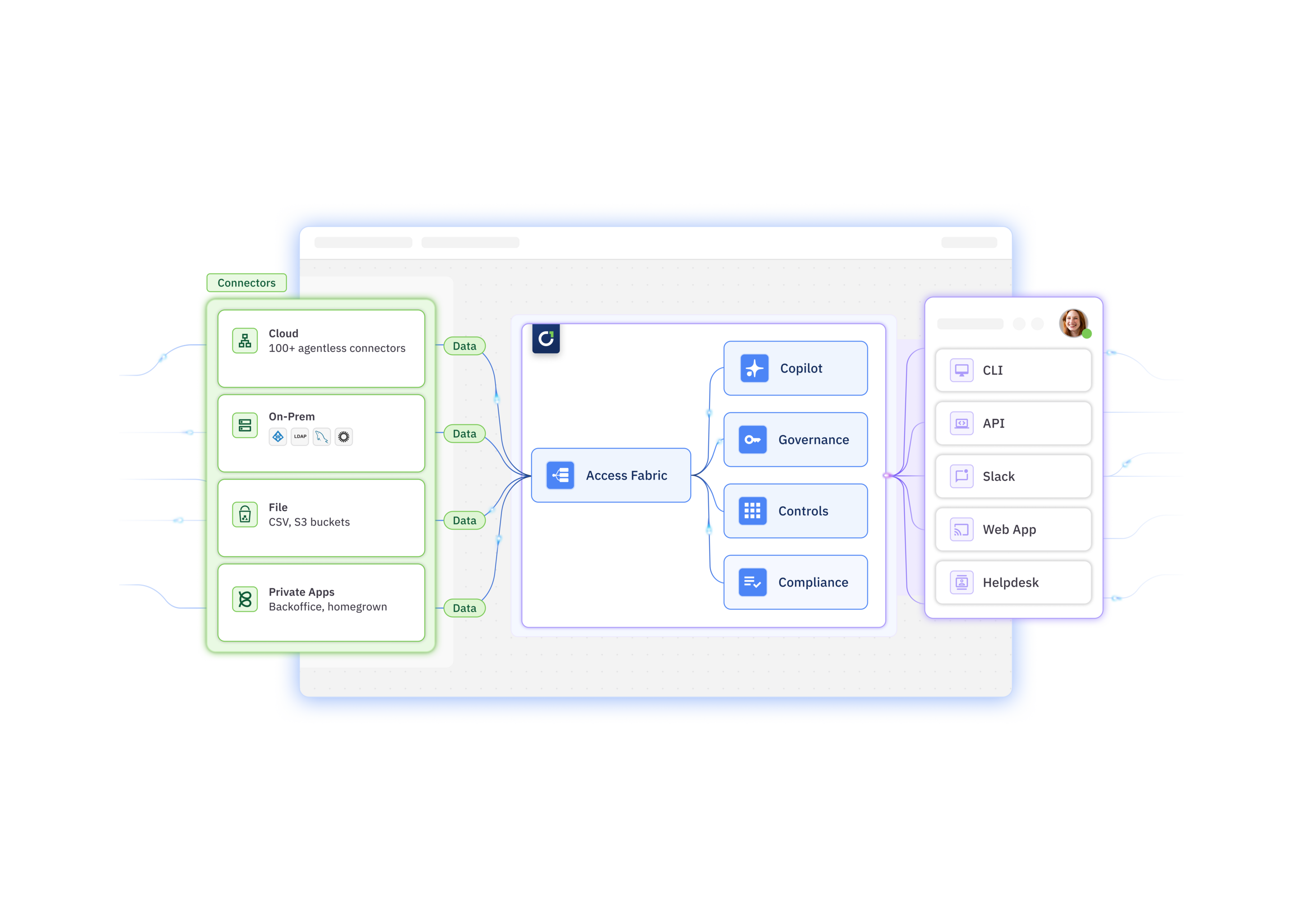
Identity Orchestration Layer: C1.ai offers a centralized identity orchestration layer, Super Directory, as your single source of truth for every identity. No more silos. Centralize identity data, group, and password management across complex enterprise environments.
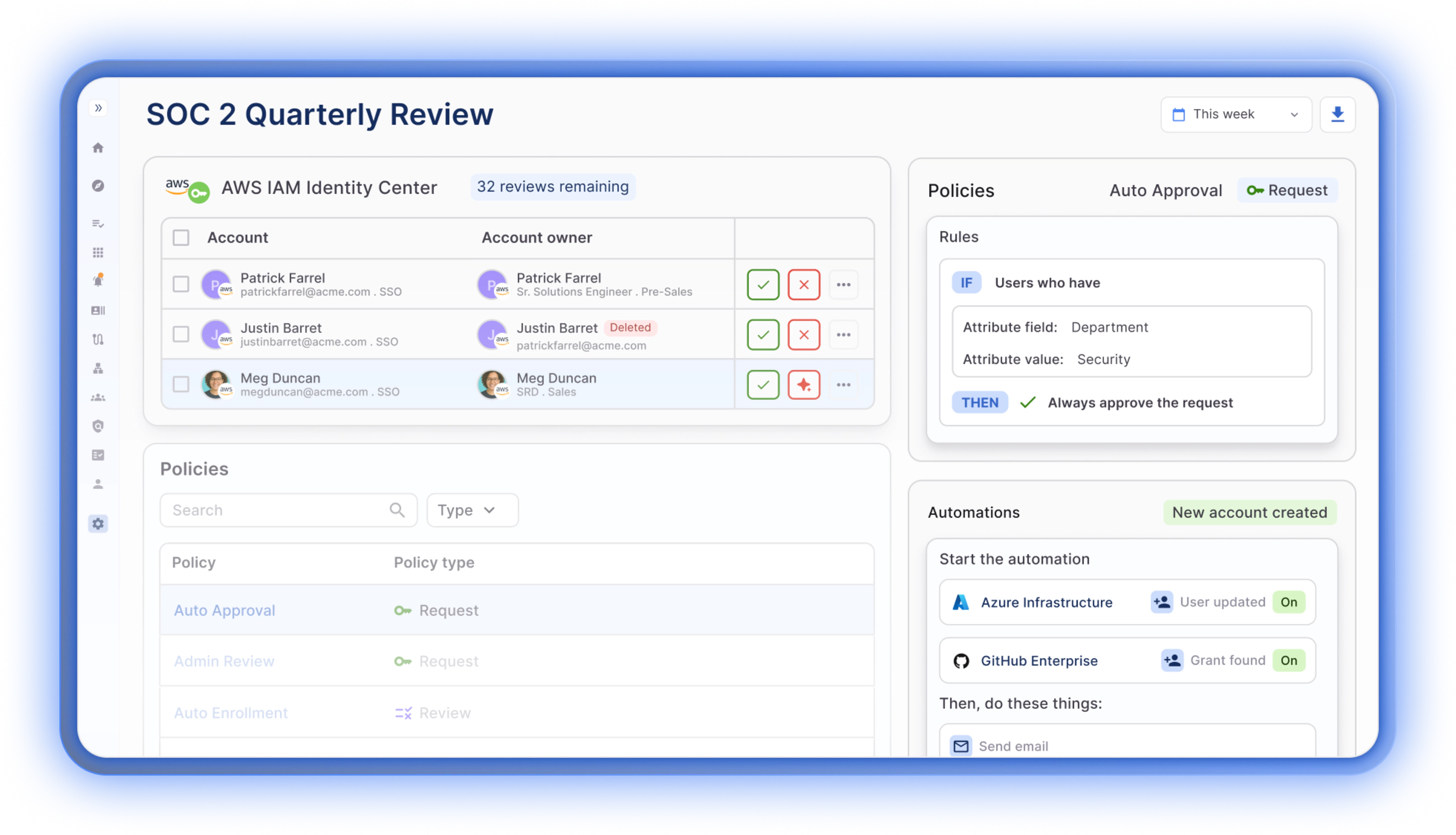
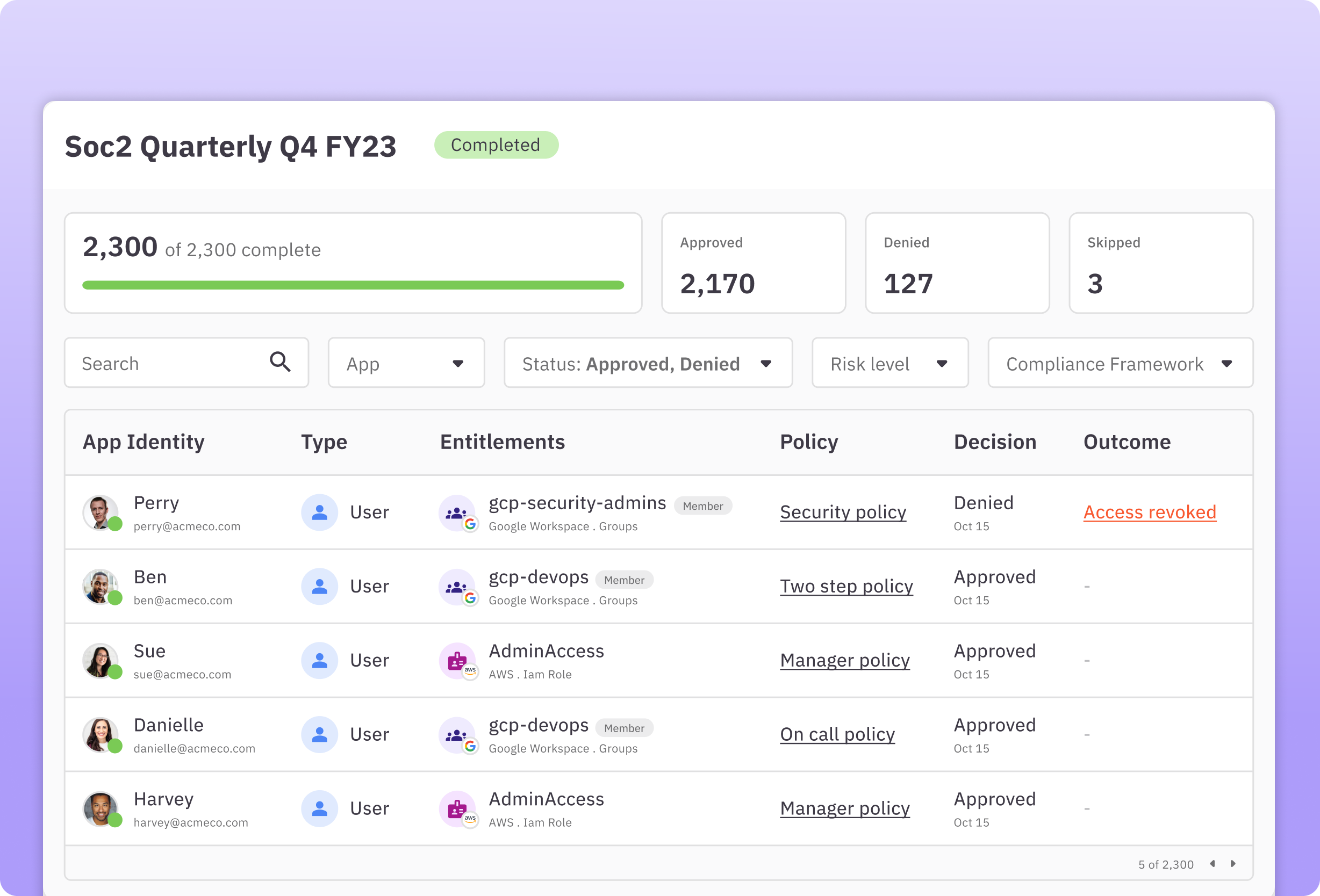
Automated, Intelligent Access Review and Compliance Reporting: C1.ai automates the entire user access review process, slashing manual work and freeing your team's time while staying on top of risks. C1.ai streamlines the process of access certifications and compliance reporting, making it a top choice for organizations focused on maintaining rigorous security standards. Companies who comply with SOX, SOC 2, PCI DSS, or HIPAA will find the automated workflows simplify compliance processes and audit trails. Organizations can customize user access reviews with multistep reviewer policies and integrate real-time notifications via Slack for review processes, auto-approvals, and zero-touch deprovisioning.
💡Learn more about access reviews →
Just-in-Time Provisioning and Self-Service Access Requests: C1.ai enhances user autonomy by enabling self-service access requests through various interfaces like Slack, Teams, CLI, or web app, paired with automatic provisioning upon approval. Customers can easily set up self-requested just-in-time access to any resource to support a zero standing privileges policy, which can significantly reduce security risks by ensuring that access rights are granted only as needed and for a limited time.
💡Learn more about JIT access →
Identity Lifecycle Management: The platform automates every phase of the identity lifecycle, from onboarding to offboarding. Simplify every stage of the joiner, mover, and leaver (JML) process with C1.ai. Features include multistep provisioning and deprovisioning workflows and the management of delegated requests. It also provides tools for detecting and revoking unused access, orphaned accounts, and deactivated users to keep the system clean and secure.
💡Learn more about access management →
Non-Human Identity Management: C1.ai discovers, inventories, maps ownership, and governs service accounts, API keys, tokens, certificates, and AI agents in the same platform as human identities. This unified approach ensures NHIs receive the same governance rigor as employee accounts.
AI-Native Governance: The C1.ai multi-agent AI platform automates access decisions, surfaces risk, and recommends remediation across the full identity lifecycle. Autonomous AI agents scale your security team by managing requests and reviews based on your security policies.
Policy-Driven Access Controls: Users can set up zero-touch, conditional, and multi-step approval policies, automatically remove access based on specific triggers such as time, non-usage, or changed justifications, and require re-requesting for particularly risky access permissions.
Developer-Friendly Configuration: C1.ai supports configuration via Terraform, access requests through its command-line tool (Cone), and extensive automation capabilities through the C1.ai API. These features make it highly appealing to technical teams that value efficiency and integration flexibility. C1.ai also offers an open-source connector SDK called Baton that allows customers to build custom connections to homegrown and private systems.
💡Learn more about the developer experience →
Why Do Customers Choose C1.ai?#
AI-Native Identity Security. C1.ai is the first AI-native identity platform that allows users to streamline identity management, access decisions, and governance with AI-driven insights and automation. Its autonomous AI agents scale your security team by managing requests and reviews based on your security policies, providing in-line risk assessments, and taking the pain out of governance.
Automation-Centric Approach. C1.ai prioritizes automation to streamline identity governance and administration processes. This reduces manual workload, speeds up response times, and minimizes the potential for human error. By automating routine tasks like provisioning, deprovisioning, and access reviews, organizations can ensure compliance and maintain tight security with less effort.
User-Friendly Interface. The platform offers a clean, intuitive interface that simplifies complex IAM tasks. It is designed to be user-friendly, allowing both technical and non-technical users to manage access controls effectively. On G2, reviewers consistently praise the platform's ease of use and the automation capabilities that significantly reduce workload.
Best-In-Class Integrations. C1.ai gives you immediate visibility and control across your entire environment with hundreds of out-of-the-box connectors and easy-to-configure custom connectors for any system.
Time to Value. C1.ai deploys in days to weeks, not months or years. The platform provides a wide range of out-of-the-box connectors for cloud and on-prem apps and infrastructure, providing security and compliance benefits almost immediately.
Scalability for Growing Needs. Whether you're expanding your team or your tech stack, C1.ai grows with you. It's designed to handle increasing numbers of users and more sophisticated access structures without a drop in performance.
Exceptional Support and Community. When you choose C1.ai, you're not just getting a software solution; you're also gaining access to a supportive community and dedicated customer service that ensures any issues you encounter are addressed promptly.
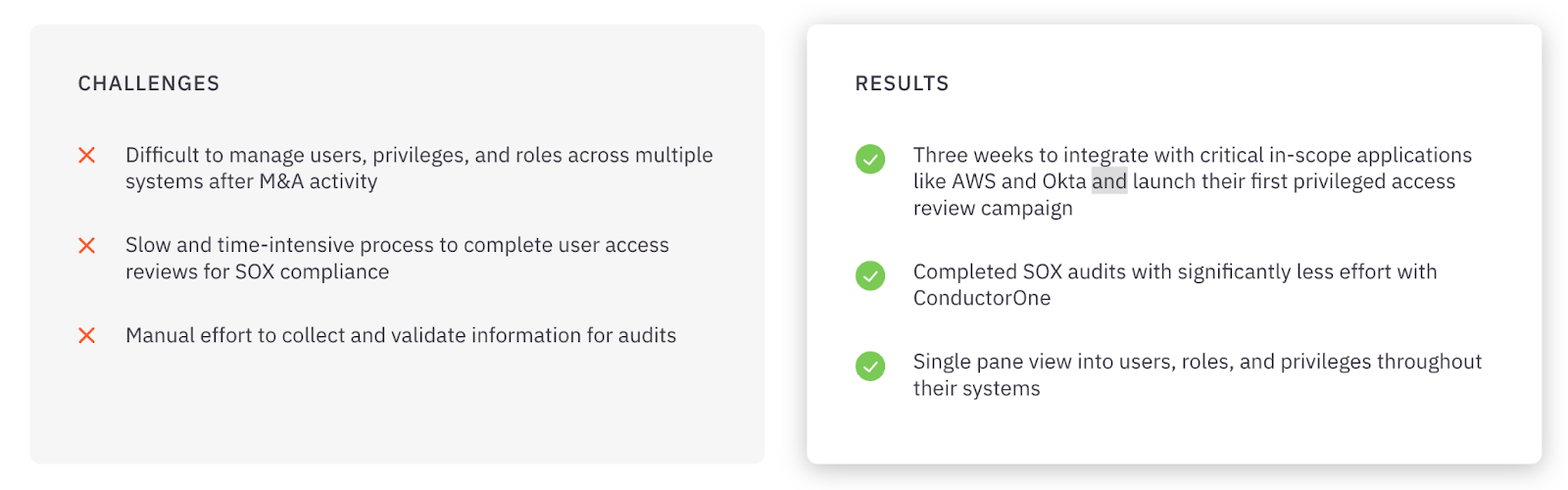
💡Case Study → How System1 manages disparate systems after M&A activity and streamlined SOX audits.

Pricing#
Contact the C1.ai team for pricing information.
2. Zluri#
Best for: Enterprises that need deep SaaS visibility and automated access governance across a sprawling application portfolio.
Zluri is a next-generation IGA platform built with a particular strength in SaaS discovery and management. Its data discovery engine scans across SSO/IdP logs, finance systems, direct integrations, browser extensions, and desktop agents to surface every application in your environment—including shadow IT and unmanaged AI tools that other platforms miss.
Zluri combines this visibility with automated access reviews, policy-based provisioning, and lifecycle management to help IT and security teams govern access at scale.
Key Features#
- Application Discovery and Management. Zluri automatically discovers all applications in use across the network, including management capabilities for monitoring software usage, compliance status, and optimization of software spend.
- One-Click Provisioning and Deprovisioning. IT administrators can instantly grant or revoke access to applications with a single click, minimizing the risk of unauthorized access.
- Spend Optimization. Advanced spend analysis tools evaluate historical data and current usage patterns to identify cost-saving opportunities, including recommendations for eliminating redundant subscriptions.
- License Management. Tracks expiration dates, renewal terms, and license utilization, alerting administrators about over or underutilization.
- Compliance Tracking. Continuously monitors software usage and ensures SaaS applications adhere to industry regulations and company policies, generating reports for audits.
Strengths#
Zluri earns strong marks on G2 (4.6/5 stars) for its intuitive interface and ease of setup. Reviewers consistently praise the platform's SaaS visibility capabilities and its ability to uncover shadow IT that other tools miss. The automation features reduce setup time and simplify user management, and the customer support team receives frequent positive mentions for responsiveness.
Weaknesses#
Reviewers on G2 note that connector coverage can be a limiting factor—some critical applications require upgraded plans or are still in development. Integration gaps can restrict full utilization for organizations with diverse application stacks. Users also flag that in-app guidance and documentation could be more robust, and initial setup may be time-consuming for less technical teams.
💡C1 Advantage → C1.ai offers better integration capabilities that allow it to seamlessly connect with a broader range of software and platforms, offering more flexibility and scalability for growing businesses.
Pricing#
Not available. Please contact Zluri for more information.
3. CyberArk#
Best for: Enterprises with stringent compliance requirements and a need for robust privileged access management.
CyberArk is the long-standing market leader in privileged access management (PAM) and has expanded into a broader identity security suite. CyberArk Identity provides SSO, adaptive MFA, lifecycle management, and identity governance alongside its core PAM capabilities—making it a strong choice for organizations where securing privileged credentials is the top priority.
CyberArk's adaptive MFA leverages AI-powered behavioral analytics and contextual signals to adjust authentication requirements dynamically. Its Secure Web Sessions capability monitors, records, and audits end-user activity in high-risk web applications, providing forensic-grade visibility for compliance and incident investigation.
Key Features#
- SaaS Security Posture Management (SSPM). Continuously assesses and manages security risks associated with SaaS applications, identifying misconfigurations, excessive permissions, and compliance deviations in real-time.
- Compliance Tracking Dashboard. Provides a comprehensive view of compliance status with various regulatory requirements, automatically aggregating data in an easy-to-understand format.
- Closed-Loop ITSM Ticketing. Enhances ITSM systems by tracking and documenting all change requests related to user access, flagging unresolved issues, and ensuring thorough follow-up.
- Extensive Integration Ecosystem. A powerful platform with many ready-to-use integrations for secure connections with any application.
- Threat Analytics. Detects suspicious activity, credential theft, and behavioral anomalies using AI-powered analytics.
Strengths#
CyberArk is highly regarded on G2 and Capterra for its depth of security capabilities. Reviewers highlight the platform's robust MFA, automatic credential rotation, and session recording as standout features. Organizations in regulated industries particularly value CyberArk's compliance support (PCI-DSS, SOX, HIPAA) and the forensic investigation capabilities.
Weaknesses#
The most common criticism across review sites is cost—CyberArk is an expensive solution, especially for smaller organizations. Deployment is complex and infrastructure-heavy, often requiring dedicated VMs and significant technical expertise. Reviewers also note that the initial setup demands a considerable time investment, the user interface can feel unintuitive, and reporting capabilities have room for improvement.
💡C1 Advantage → The C1.ai platform's real-time analytics provide deeper insights into access patterns and potential security risks, allowing organizations to manage their security posture more effectively.
Pricing#
CyberArk offers five pricing tiers ranging from $2 to $5 per user per month. A 30-day free trial is available for the Secure Cloud Access product. Enterprise pricing with volume discounts is available for larger deployments.
4. SailPoint#
Best for: Large enterprises with complex identity landscapes that need deep governance, compliance automation, and AI-driven analytics.
SailPoint delivers enterprise-grade identity governance and administration through its Identity Security Cloud platform. SailPoint's strength lies in the depth of its governance capabilities—access reviews, policy enforcement, separation of duties, compliance reporting, and AI-driven analytics that detect unusual access patterns and excessive permissions.
SailPoint is built for organizations where identity governance is a board-level priority and where the complexity of the environment demands a platform that can scale.
Key Features#
- Access Modeling. Simulates and models access changes before they are applied, helping understand the implications and ensuring alignment with security and compliance requirements.
- File Access Manager. Protects sensitive unstructured data stored across files and cloud storage by automatically discovering where sensitive data resides and who has access.
- IdentityIQ. SailPoint's flagship identity governance platform integrates with existing IT infrastructures for comprehensive governance across all users, applications, and data.
- Automated Access Recommendations. Utilizes advanced algorithms to provide automated recommendations derived from peer group analyses, identity attributes, and historical access activities.
- Role Management. Includes role-based access control (RBAC) capabilities for streamlining access rights assignment based on job functions.
Strengths#
SailPoint is well-regarded on G2 and Capterra for its comprehensive feature set and deep enterprise application integrations. Reviewers highlight the automation of identity lifecycle processes and proactive risk detection capabilities. Organizations in regulated industries value SailPoint's policy enforcement and audit reporting.
Weaknesses#
The most frequently cited drawbacks are cost and complexity. SailPoint requires significant upfront investment—both financially and in terms of implementation effort. Reviewers note a steep learning curve that can require weeks of administrator training, and the administrative console is described as complex and sometimes difficult to navigate.
💡C1 Advantage → C1.ai offers a more nimble, cost-effective solution with significantly faster deployment times (think days or weeks, not months or years), ideal for businesses seeking more flexibility and quick ROI.
Pricing#
SailPoint uses a subscription-based model with tiered plans. Entry-level pricing for IdentityIQ starts at approximately $75,000 per year. Pricing varies based on user count and selected feature packages.
5. Okta Workforce Identity Cloud#
Best for: Cloud-forward mid-market and enterprise organizations that need best-in-class SSO and a massive application integration ecosystem.
Okta is one of the most widely adopted IAM platforms in the world, known for its extensive app integration network, reliable SSO, and adaptive MFA. Okta serves as the identity layer connecting employees to thousands of cloud and on-prem applications, with automated lifecycle management and API access management rounding out the platform.
Okta's strength lies in its breadth—the Okta Integration Network includes thousands of pre-built connectors, and the platform's adaptive authentication uses AI to evaluate contextual signals and adjust security requirements in real time.
Key Features#
- Adaptive Multi-Factor Authentication (MFA). Evaluates the risk level of each access request based on factors such as location, device, and user behavior.
- Lifecycle Management. Automates the entire lifecycle of user identities with efficient provisioning and deprovisioning processes integrated with HR systems.
- API Access Management. Secures APIs by ensuring only authorized users and services can access them, utilizing OAuth and OpenID Connect protocols.
- Advanced Server Access (ASA). Provides secure, identity-led access to infrastructure resources with a Zero Trust approach.
- Access Gateway. Secures access to on-premises applications without changing how those applications are configured.
- Okta Single Sign-On (SSO). Guarantees users easy and secure access to all their applications through one login portal with thousands of pre-integrated apps.
Strengths#
Okta receives consistently high ratings on Capterra (4.7/5 from 900+ reviews). Reviewers praise the intuitive interface, seamless SSO experience, and the sheer breadth of application integrations. Customer support is frequently described as excellent.
Weaknesses#
Pricing is the most common concern—advanced features drive costs up quickly, and the $1,500 annual minimum can be a barrier for smaller organizations. Reviewers also cite a steep learning curve during initial setup, mobile app inconsistencies, and occasional technical glitches.
💡C1 Advantage → C1.ai can connect to apps and systems outside of a customer's IdP and enables access control to more fine-grained resources.
Pricing#
Okta pricing varies based on plan:
- Starter: $6 per user per month
- Essentials: $17 per user per month
- Professional: Inquire for pricing
- Enterprise: Inquire for pricing
6. Microsoft Entra ID#
Best for: Microsoft-centric organizations that want seamless IAM integrated directly into their existing Microsoft 365 and Azure environment.
Microsoft Entra ID (formerly Azure Active Directory) is a cloud-native identity and access management solution that provides SSO, MFA, conditional access, and directory services tightly integrated with the Microsoft ecosystem. For organizations already running Microsoft 365 and Azure, Entra ID is often the natural starting point for IAM because it is included with existing subscriptions.
Entra ID's conditional access policies analyze user behavior, device health, location, and risk signals to make real-time access decisions—blocking or stepping up authentication when conditions warrant it.
Key Features#
- Secure Hybrid Access. Bridges on-premises and cloud environments, facilitating secure access to applications regardless of where they are hosted.
- Conditional Access. A policy-based engine that enforces automated access-control decisions based on conditions, leveraging real-time data analytics.
- Passwordless Authentication. Supports biometrics, hardware tokens, or Windows Hello to simplify and strengthen user access security.
- Privileged Identity Management (PIM). Controls, manages, and monitors access to critical resources with just-in-time privileged access.
- Cross-Platform Compatibility. Designed to work seamlessly across both Microsoft and non-Microsoft environments.
Strengths#
On G2, the most frequently cited strength is the seamless integration with the broader Microsoft ecosystem. Reviewers value the strong security posture and the adaptive MFA capabilities. Setup is described as straightforward for organizations already using Azure.
Weaknesses#
The licensing model is a persistent pain point—pricing escalates significantly for advanced features like Entra ID Governance and PIM, which require P2 licenses. Reviewers note that third-party application integration is more limited compared to competitors like Okta, documentation is sometimes outdated, and technical support experiences are inconsistent.
💡C1 Advantage → C1.ai offers a more streamlined approach compared to Microsoft Entra ID, focusing on simplifying the user experience without sacrificing security features.
Pricing#
Microsoft Entra pricing varies by plan:
- Microsoft Entra ID P1. $6 per user/month.
- Microsoft Entra ID P2. $9 per user/month.
- Microsoft Entra Suite. $12 per user/month.
7. Ping Identity#
Best for: Developer-centric enterprises that need flexible, API-driven IAM with advanced adaptive authentication.
Ping Identity takes an API-first approach to identity and access management, making it a strong choice for organizations that need deep customization and developer-friendly tooling. The platform provides SSO, adaptive authentication, MFA, and identity verification with extensive API documentation, Postman collections, and developer resources.
Ping Identity's adaptive authentication evaluates device posture, geolocation, IP reputation, and behavioral signals to dynamically adjust authentication requirements—creating a frictionless experience for low-risk access and stronger verification for high-risk scenarios.
Key Features#
- PingOne Risk Management. Utilizes analytics to assess the risk associated with user access requests, determining the likelihood of fraud and applying appropriate security measures.
- PingIntelligence for APIs. Leverages AI and machine learning to protect APIs by detecting and mitigating threats in real-time.
- PingFederate. An identity federation and access management solution supporting SAML, WS-Federation, and OAuth for secure cross-domain interactions.
- PingDirectory. A highly scalable directory server for user and device profiles, designed for large volumes of identity data.
- PingAccess. Fine-grained access control to applications and APIs, working seamlessly with PingOne to enforce policies based on roles, attributes, and context.
- PingID. Robust multi-factor authentication supporting biometrics, SMS, email, and push notifications with adaptive strength.
Strengths#
On G2, Ping Identity is praised for its ease of use, flexibility, and developer-friendly approach. Reviewers highlight the quality of the documentation and community support. The adaptive authentication capabilities and SSO functionality receive consistently high marks.
Weaknesses#
Reviewers note that setup and maintenance of adaptive authentication features can be confusing. Users report authentication issues with delayed notifications and OTP delivery problems. Provisioning across diverse environments is described as less intuitive than competitors, and pricing can be prohibitive for smaller organizations.
💡C1 Advantage → C1.ai offers self-service capabilities, allowing end-users to manage their credentials and access rights more efficiently, which reduces IT overhead and enhances overall user satisfaction.
Pricing#
Not available. Please contact Ping Identity for more information.
8. JumpCloud#
Best for: Distributed and remote-first organizations that need unified identity and device management across every operating system.
JumpCloud is a cloud-based directory platform that combines identity management with cross-platform device management—covering Windows, macOS, Linux, iOS, and Android from a single console. This makes JumpCloud particularly valuable for organizations with heterogeneous device fleets and remote or hybrid workforces.
JumpCloud supports LDAP, RADIUS, SAML, and SCIM protocols, provides SSO with 2,600+ integrations, and enforces zero-trust conditional access policies that factor in device compliance, user identity, and contextual risk.
Key Features#
- Cloud Directory. Provides centralized user identity management as a cloud-native replacement or complement to Active Directory.
- Cross-Platform Device Management. Manages Windows, macOS, Linux, iOS, and Android devices from a single console with policy enforcement and compliance verification.
- Single Sign-On. Provides SSO with 2,600+ application integrations via SAML and OIDC.
- Multi-Factor Authentication. JumpCloud Protect offers push-based MFA and passwordless login via JumpCloud Go.
- Zero-Trust Conditional Access. Policies evaluate device compliance, user identity, and context on every access request.
- Comprehensive Audit Logging. Tracks user and device activity for compliance and forensic analysis.
Strengths#
JumpCloud receives positive reviews on G2 and Capterra for its centralized identity management, smooth zero-touch onboarding, and broad integration support. Reviewers value the ability to manage both identity and devices in a single platform. The JumpCloud Go passwordless login feature earns specific praise.
Weaknesses#
Reviewers note that advanced configurations can be complex and require additional learning. The interface can feel cluttered with settings in unintuitive places. Real-time device status updates occasionally lag, Linux support does not cover all distributions, and device reports lack detail on enforcement and policy information.
💡C1 Advantage → C1.ai offers a more lightweight and flexible solution that excels at identity governance and access automation, making it ideal for businesses that require quick deployment and easy scalability without the complexity often associated with large-scale device management.
Pricing#
JumpCloud offers several tiers: SSO at $11/user/mo, Device Management at $9/user/mo, Device Identity at $13/user/mo, Platform at $19/user/mo, and Platform Prime at $24/user/mo. A free tier is available for up to 10 users and devices, and a 30-day free trial provides full platform access.
9. OneLogin#
Best for: Mid-market organizations that prioritize ease of use and fast SSO deployment with adaptive authentication.
OneLogin is a Unified Access Management (UAM) platform that centralizes all your organization's access, both on-premises and in the cloud. It provides comprehensive control, management, and security for your data, devices, and users.
The platform streamlines administrative tasks including application rollout, new employee onboarding, and de-provisioning, while reducing access-related helpdesk requests through a self-service password reset feature. OneLogin's SmartFactor Authentication engine dynamically adjusts authentication requirements based on contextual risk signals.
Key Features#
- App Catalog. Boasts over 5,000 pre-integrated applications, simplifying the implementation of SSO and user provisioning.
- Adaptive Authentication. Utilizes machine learning for dynamic risk assessments, identifying high-risk login attempts and prompting MFA. Risk scores are generated based on network reputation, geographic location, device fingerprinting, and time anomalies.
- One Click On- and Off-Boarding. Automates onboarding and offboarding with real-time Active Directory synchronization, reflecting changes in target applications within seconds.
- Unified Endpoint Management. Integrates laptops and desktops with the OneLogin Cloud Directory for single-login access to all linked applications.
- Mobile Identity. Provides secure access to all cloud and enterprise apps through a mobile platform running fully functional web applications.
- VigilanceAI. OneLogin's proprietary machine learning engine analyzes data to establish user behavior profiles, detecting and alerting on behavioral anomalies in real-time.
Strengths#
OneLogin receives strong usability ratings across review platforms—TrustRadius gives it a 9.6/10 for SSO functionality. Reviewers consistently praise the ease of use, effective password consolidation, and robust MFA capabilities. The platform's Active Directory integration and flexible pricing are frequently highlighted.
Weaknesses#
Common concerns include slow loading times, complex initial setup for larger organizations, occasional connectivity disruptions, and forced logouts every four hours. Active Directory syncing issues and login failures are reported intermittently. The mobile app experience is described as needing improvement.
💡C1 Advantage → The C1.ai platform's advanced analytics and reporting capabilities provide deeper insights into access behaviors and potential vulnerabilities.
Pricing#
Not available. Please contact OneLogin for more information.
10. IBM Security Verify#
Best for: Enterprises implementing zero-trust security with a need for AI-powered risk-based authentication and threat intelligence.
IBM Security Verify is a robust IAM solution that empowers security teams to implement risk-based access policies, facilitating frictionless user authentications across web, mobile, and cloud applications, as well as APIs. Leveraging standard protocols, it offers Identity-as-a-Service, helping organizations enhance security and modernize digital experiences.
The platform uses device fingerprinting, behavioral anomaly detection, and contextual analysis to make intelligent, risk-based access decisions—tightening security when risk is elevated and reducing friction when context is trusted.
Key Features#
- Centralized Credential Vault. Encrypts and centralizes all privileged credentials within a secure vault with strict security controls.
- Comprehensive Account Identification. Automatically identifies all types of privileged accounts including service, application, administrator, and root accounts.
- Automated Password Management. Automates password changes, enforces complex password creation, and systematically rotates credentials.
- Managed Access and Monitoring. Controls and monitors user sessions through session launching, proxies, active monitoring, and recording.
- Risk-Based Authentication. AI-powered adaptive access integrating IBM Trusteer threat intelligence for intelligent, contextual access decisions.
- Identity Analytics. Behavioral anomaly detection with configurable risk scoring rules.
Strengths#
IBM Security Verify is valued for its sophisticated AI-powered contextual analysis and comprehensive risk scoring. Reviewers on G2 highlight the zero-trust security implementation, usage-based pricing model, and the depth of analytics capabilities. The 90-day free trial with unlimited applications is one of the most generous in the market.
Weaknesses#
Reviewers note that implementation can be complex and requires skilled personnel. The total cost of ownership can be considerable for large-scale deployments. The platform's learning curve is steeper than more user-friendly competitors, and smaller organizations may find the enterprise-oriented design overkill for their needs.
💡C1 Advantage → C1.ai offers enhanced automation features that streamline identity governance and administrative tasks, resulting in significant time savings and reduced human errors.
Pricing#
IBM Security Verify uses a usage-based pricing model. Sample pricing for 5,000 active users: SSO at $1.71/user/mo, MFA at $1.71/user/mo, Adaptive Access at $1.71/user/mo, Lifecycle & Provisioning at $2.01/user/mo, and Identity Analytics at $2.13/user/mo. A 90-day free trial with all use cases and unlimited applications is available.
How to Choose the Right IAM Tool#
Choosing the right IAM tool is less about finding the "best" platform and more about finding the one that matches where your organization is today and where it is headed. Here is a practical decision-making framework.
Start with your primary pain point. If you do not yet have centralized authentication, start with an SSO/IdP solution like Okta, Microsoft Entra ID, or Ping Identity. If you have SSO in place but are struggling with access reviews, compliance, or lifecycle management, you need an IGA platform like C1.ai or SailPoint. If privileged accounts and admin credentials are your biggest risk, prioritize a PAM solution like CyberArk.
Consider your organizational maturity. Early-stage and mid-market organizations often benefit from platforms that are fast to deploy, easy to use, and do not require dedicated identity engineering teams. C1.ai, JumpCloud, and OneLogin fit this profile well—they deliver meaningful value within days or weeks, not months. Larger enterprises with complex identity landscapes and dedicated IAM teams may need the depth of SailPoint or CyberArk, but should budget accordingly for implementation timelines and professional services.
Assess your identity landscape. If your organization runs primarily on Microsoft, Entra ID is a natural fit and comes bundled with your existing licenses. If you are managing a sprawling SaaS portfolio, Zluri's application discovery engine may surface risks you did not know existed. If you need to govern non-human identities—service accounts, API keys, AI agents—look for platforms like C1.ai that treat NHIs as first-class citizens.
Evaluate total cost of ownership, not just license price. A platform that costs $2/user/month but requires six months of professional services and a dedicated admin team may be far more expensive than a solution at $5/user/month that deploys in hours and runs with minimal overhead. Factor in implementation time, training, ongoing administration, and the cost of delayed value.
Think about where the market is going. AI agents, non-human identities, and multi-cloud complexity are accelerating. Choose a platform that is investing in these areas today, not one that will need to bolt them on later. The best IAM investments are the ones that grow with you.
Centralize Control and Simplify User Access Management with C1.ai#
Imagine managing all your identity and access controls from one powerful platform. C1.ai makes this a reality.
By centralizing control, C1.ai simplifies the complexity of managing multiple systems and significantly cuts down the chances of errors. You gain clear oversight over user activities and permissions, ensuring that your organization's data is always protected and compliance is maintained.
C1.ai streamlines your daily operations by automating routine tasks such as user provisioning and deprovisioning, significantly reducing the burden on your IT team. This automation drastically lowers the risk of security breaches that can occur due to human error.
For example, Zscaler faced fragmented, manual, and inconsistent access processes across the organization. Access requests and reviews were handled differently in each department, provisioning took weeks, and there was no single place for employees to request what they needed. By adopting C1.ai, the company centralized access requests, automated lifecycle workflows, and replaced manual reviews with streamlined, policy-driven governance.
In addition to automating complex IT and security tasks, C1.ai helps organizations achieve least privilege across their organization. For example, Instacart needed a faster, safer way to manage privileged access across its growing engineering organization. Manual, manager-based approvals were slowing teams down and creating gaps in visibility. With C1.ai, Instacart centralized access management, automated privileged workflows, and implemented just-in-time access across critical apps and infrastructure.
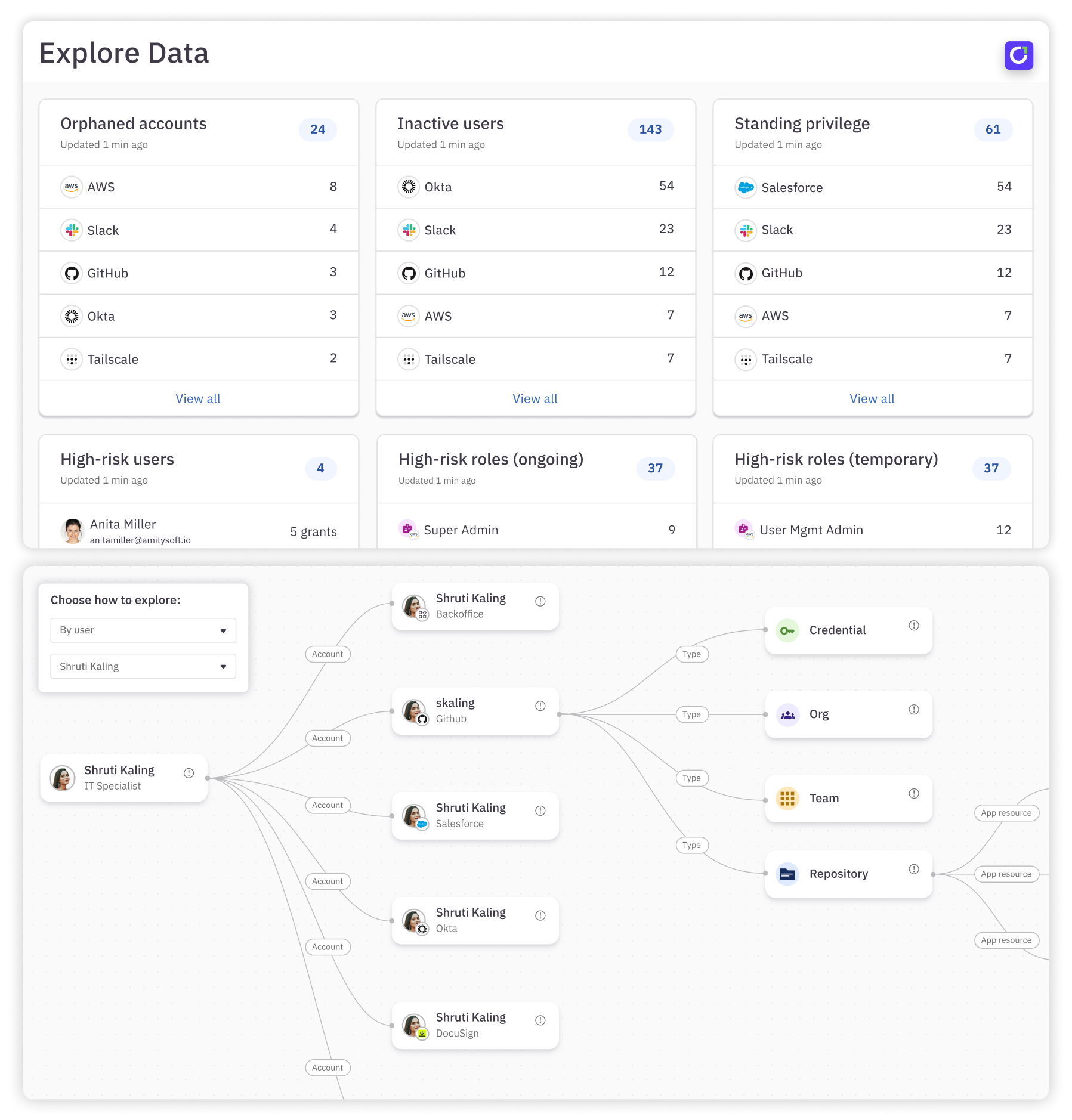
By choosing C1.ai, you move toward a more controlled and simplified access management system that puts your team's needs—and security—first.
Talk to our team or take a self-guided tour to learn more!
IAM FAQs in 2026#
What's the difference between IAM and IGA?#
Identity and Access Management (IAM) focuses on authentication, authorization, and ensuring the right users can access the right systems. It typically includes SSO, MFA, directories, and basic provisioning.
Identity Governance and Administration (IGA) adds governance on top of IAM, including access reviews, policy enforcement, separation of duties, audit reporting, and lifecycle management.
In short:
- IAM = Who are you and can you log in?
- IGA = Should you still have this access? Who approved it? Can we prove that to auditors?
Most modern buyers need both, as governance is now central to compliance and zero trust.
Why are IAM tools important?#
As companies grow, so does the complexity of managing user access. More people, more apps, more systems, and more risk. And the explosion of AI identities are making things even more complicated. Identity and access management tools help organizations keep control by scaling with the business and centralizing how access is granted, monitored, and secured.
How does IAM support Zero Trust?#
Zero trust assumes no user or device should be trusted automatically, even if inside the network. IAM supports Zero trust by:
- Enforcing continuous authentication and authorization
- Applying least privilege and role-based access
- Leveraging contextual policies (location, device, behavior)
- Reducing standing privileges through JIT access
- Centralizing visibility into all entitlements and accounts
- Detecting identity anomalies that indicate compromise
IAM is effectively the control plane that enables zero trust to work.
Do IAM tools replace Active Directory?#
No, IAM tools don't typically replace Active Directory (AD). Instead, they integrate with AD or Entra ID (Azure AD) to:
- Sync users and groups
- Enforce consistent access policies
- Extend identity to cloud apps
- Automate provisioning and deprovisioning
- Layer governance and Zero Trust frameworks on top
If an organization is fully cloud-native, AD may play a smaller role, but IAM doesn't eliminate directory services, it orchestrates them.
Which IAM tools integrate best with HRIS systems?#
Most HR-driven workflows rely on integration with systems like Workday, BambooHR, Rippling, or UKG. The strongest HRIS integrations usually come from:
- C1.ai — deep lifecycle management with HRIS triggers, multi-step workflows, JIT access, and offboarding automation
- Okta — popular Workday provisioning connector
- Microsoft Entra ID — native Microsoft ecosystem integration
- SailPoint — enterprise-grade HRIS connectors with governance
The more automation your onboarding and offboarding requires, the more important HRIS-first workflows become.
How long does IAM implementation take?#
Implementation timelines vary widely depending on the tool and environment. Typical ranges:
- Modern cloud IAM / IGA tools like C1.ai: days to weeks
- Traditional enterprise IGA tools like SailPoint: 3–12 months
Factors that affect timeline: number of applications and connectors, breadth of provisioning/deprovisioning automation, governance maturity, and whether custom integrations are required. Organizations increasingly prefer platforms with fast time-to-value and minimal professional services.
Which IAM tools work best for multi-cloud environments?#
Organizations using AWS, GCP, and Azure simultaneously need tools that normalize identity across heterogeneous systems. Strong multi-cloud IAM options include:
- C1.ai — broad connector ecosystem, infrastructure access control, JIT workflows, and unified identity fabric
- SailPoint — governance-focused multi-cloud visibility
- Okta — strong cloud application coverage
- Microsoft Entra ID — excellent for Azure-heavy environments, but less flexible across AWS/GCP without add-ons
The best tool depends on whether the priority is app access (Okta), governance (SailPoint), or automation + identity security (C1.ai).
How do IAM tools work? (architecture overview)#
IAM platforms unify identity data, authenticate users, make authorization decisions, and enforce policies across applications and infrastructure. Here is how IAM tools work:
Identity Provider (IdP). The IdP verifies who the user is and issues the authentication assertion. Examples include Okta, Microsoft Entra, and Ping.
Directories and Universal Directory. Directories act as the identity source of truth with user attributes, roles, and group memberships. Modern IAM tools offer universal directories that sync data from multiple systems.
Provisioning and Lifecycle Management. IAM tools automate user onboarding, role changes, and offboarding by provisioning and removing access across apps and systems. This ensures access stays aligned with employment status and reduces stale permissions.
Access Governance and Certifications. Governance ensures that users have only the access they need. Certifications provide scheduled or continuous reviews of permissions to meet compliance requirements and enforce least privilege.
Audit Trails and Reporting. Centralized logs track who accessed what, when they accessed it, and how their permissions changed. These records support forensic analysis, compliance, and internal audits.