> ## Documentation Index
> Fetch the complete documentation index at: https://www.c1.ai/docs/llms.txt
> Use this file to discover all available pages before exploring further.
# C1 groups
> Create custom groups in the C1 app that dynamically adjust their membership based on adherence to a membership rule.
## What are C1 groups?
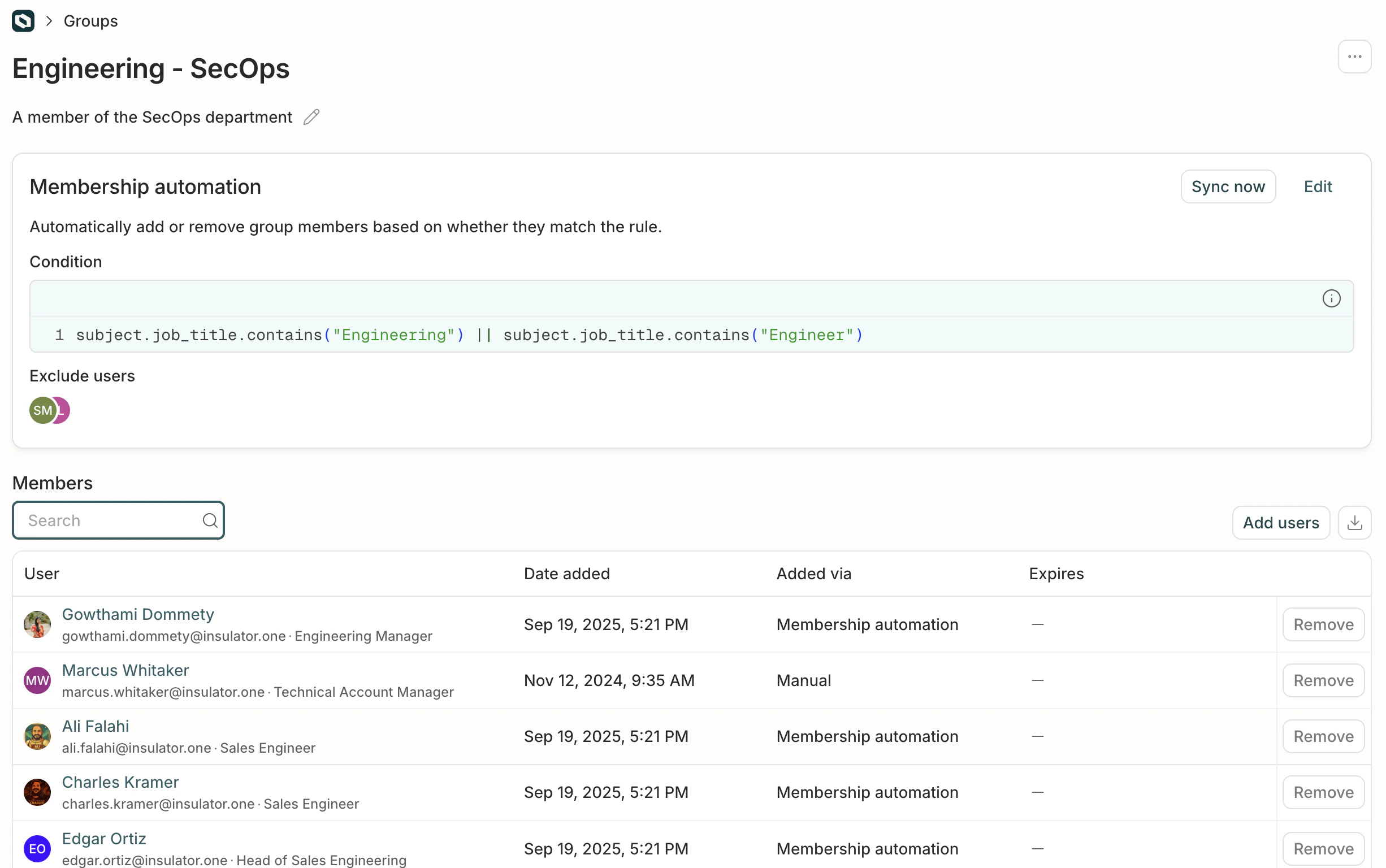 C1 groups are collections of C1 users that you create and use within C1. These groups are resources in [the C1 app](/product/admin/c1-for-c1).
## What can I do with a C1 group?
Key uses for these special groups include:
* **Organizing employees without creating custom IdP groups.** C1 groups make it easy to create groups of employees who share key profile attributes or combinations of access.
* **Specifying who is granted an access profile.** An access profile can be requestable by, or automatically assigned to, a C1 group.
* **Assigning a group as reviewer on a policy step.** A C1 group can be set as a policy step reviewer.
## What kind of groups should I make?
When considering what groups to make, think about how you want to organize your employees for access management, access profile, and policy reviews. Groups provide a flexible way to do so without needing to manage complex groups in your identity provider.
Here are some ideas for groups you might create in C1:
* **Department or team-based groups:** For example, "Marketing Team", "Engineering Department", "Sales". This helps organize employees and manage access relevant to those teams.
* **Role-based groups:** For example, "Software Engineers", "Data Analysts", "Project Managers". This is useful for assigning access based on job function.
* **Location-based groups:** For example, "Portland Office", "London Team". Useful if access varies by location.
* **Project-based groups:** For temporary teams working on specific projects, like "Spruce Mongoose Team".
* **Reviewer groups:** Groups specifically created to be used as reviewers in policies. For example, "Security Reviewers", "Legal Reviewers".
## Create a new C1 group
Create a C1 group by setting a rule for membership. C1 will dynamically add or remove members from the group based on their adherence to the rule.
Navigate to **Directory** > **Dynamic groups** and click **Create group**.
Give your new group a name and add a description. Click **Create group**.
In the **Membership automation** section of the page, click **Edit**.
Choose how to form your membership rule:
* Use the **Basic** condition builder to construct a rule from a combination of entitlements and [profile attributes](/product/admin/attributes) (see note below on which profile attributes are supported), with the option to add **and** and **or** statements to refine the rule.
**Supported attributes in the basic condition builder** The value input field in the basic condition builder currently only supports string values. Certain attributes are stored as enums (fixed lists of values) or arrays (multiple values), which cannot be correctly parsed when entered as a simple string in the basic builder. If you use these attributes in the basic builder, the system will treat the input as a literal string, and the policy or membership rule may not behave as expected.
The following attributes are not supported in the basic condition builder:
* Additional Employee ID
* Additional Username
* Additional Email
* Directory Status
* Manager Email
If you need to use any of the attributes listed above, you must compose a CEL expression in the **Expression** field.
* Use the **Expression** field to to compose a [CEL expression](/product/admin/expressions) that describes the membership rule.
Click **Preview** to check the syntax of your membership rule.
C1 groups are collections of C1 users that you create and use within C1. These groups are resources in [the C1 app](/product/admin/c1-for-c1).
## What can I do with a C1 group?
Key uses for these special groups include:
* **Organizing employees without creating custom IdP groups.** C1 groups make it easy to create groups of employees who share key profile attributes or combinations of access.
* **Specifying who is granted an access profile.** An access profile can be requestable by, or automatically assigned to, a C1 group.
* **Assigning a group as reviewer on a policy step.** A C1 group can be set as a policy step reviewer.
## What kind of groups should I make?
When considering what groups to make, think about how you want to organize your employees for access management, access profile, and policy reviews. Groups provide a flexible way to do so without needing to manage complex groups in your identity provider.
Here are some ideas for groups you might create in C1:
* **Department or team-based groups:** For example, "Marketing Team", "Engineering Department", "Sales". This helps organize employees and manage access relevant to those teams.
* **Role-based groups:** For example, "Software Engineers", "Data Analysts", "Project Managers". This is useful for assigning access based on job function.
* **Location-based groups:** For example, "Portland Office", "London Team". Useful if access varies by location.
* **Project-based groups:** For temporary teams working on specific projects, like "Spruce Mongoose Team".
* **Reviewer groups:** Groups specifically created to be used as reviewers in policies. For example, "Security Reviewers", "Legal Reviewers".
## Create a new C1 group
Create a C1 group by setting a rule for membership. C1 will dynamically add or remove members from the group based on their adherence to the rule.
Navigate to **Directory** > **Dynamic groups** and click **Create group**.
Give your new group a name and add a description. Click **Create group**.
In the **Membership automation** section of the page, click **Edit**.
Choose how to form your membership rule:
* Use the **Basic** condition builder to construct a rule from a combination of entitlements and [profile attributes](/product/admin/attributes) (see note below on which profile attributes are supported), with the option to add **and** and **or** statements to refine the rule.
**Supported attributes in the basic condition builder** The value input field in the basic condition builder currently only supports string values. Certain attributes are stored as enums (fixed lists of values) or arrays (multiple values), which cannot be correctly parsed when entered as a simple string in the basic builder. If you use these attributes in the basic builder, the system will treat the input as a literal string, and the policy or membership rule may not behave as expected.
The following attributes are not supported in the basic condition builder:
* Additional Employee ID
* Additional Username
* Additional Email
* Directory Status
* Manager Email
If you need to use any of the attributes listed above, you must compose a CEL expression in the **Expression** field.
* Use the **Expression** field to to compose a [CEL expression](/product/admin/expressions) that describes the membership rule.
Click **Preview** to check the syntax of your membership rule.
Note that not all users who match the membership rule will be shown immediately when you click **Preview**.
**Optional.** In the **Excluded users** field, add the names of any users who should be excluded from this group, even if they match the membership rule.
When you're satisfied, click **Save**. The **Membership rule** section syncs and updates the list of matching users.
Depending on the number of users in your C1 installation, syncing might take some time. When syncing is complete, the **Syncing** label will be replaced by a **Last sync** timestamp.
**Done.** Your C1 group is now ready for use elsewhere in the app. The group will re-sync every hour to check which C1 users match the rule you set, and will add or remove group members accordingly.
## Duplicate a C1 group
Need a group that's similar to one that already exists? To save time, you can duplicate an existing group and then make adjustments as needed.
On the **Dynamic groups** page, find the group you want to duplicate.
Click the **...** (more actions) menu, then choose **Duplicate**.
The new group will be pre-filled with the same name, description, and membership rule as the original, which you can then edit.
## Manually add users to a group
If you need to manually add users to the access profile who do not match the membership automation condition, click **Add users**.
The users you add will be shown in the list of members, with a notation that they were added manually, rather than by membership automation.
## Frequently asked questions about C1 groups
A new sync is kicked off each hour.
No, currently C1 groups cannot be added to access profiles.